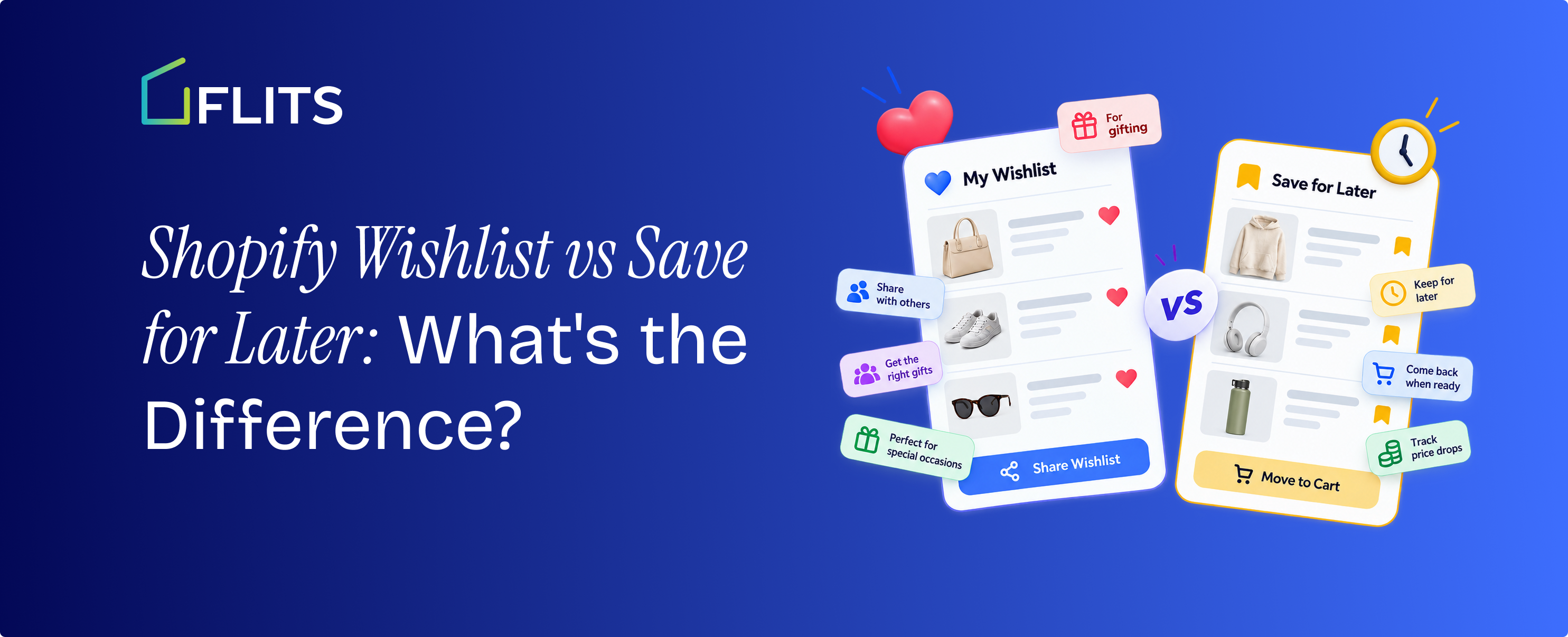
Most Shopify stores use these two terms as if they mean the same thing. They don't. "Save for later" is a cart feature: it holds an item a shopper isn't ready to buy right now, usually inside the same session or account that put it there. A wishlist is a different kind of feature entirely: a standalone, persistent list tied to the shopper, meant to survive a closed tab, a new device, or a return visit three weeks later.
The distinction changes what happens after a shopper leaves your store without buying, which is most of them. Cart abandonment averages 70.22% across ecommerce, based on Baymard Institute's analysis of more than 50 individual studies.
Whether the thing that shopper touched on the way out is a session-bound cart save or a durable, marketable wishlist entry decides whether you get a second chance at that sale. This guide covers what each feature actually is, where they overlap, and how to decide what your store needs, backed by UX research and consumer data most comparisons on this topic skip entirely.
Key Takeaways
- Save for later lives inside the cart and is typically tied to a browser session or account; a wishlist is a standalone, persistent list tied to the shopper's identity, built to survive a closed tab or a new device.
- 18% of shoppers who abandon mid-checkout cite being asked to create an account as the reason, which is exactly the friction a well-built guest wishlist is designed to remove.
- Nielsen Norman Group's research on this specific behavior found that shoppers often resist dedicated "wishlist" pages due to setup friction and the word's gift-giving connotation, preferring to treat the cart as an informal holding area instead.
- The two features aren't competitors. Save for later handles the fast, in-session save; a wishlist handles the considered purchase a shopper wants to track and revisit, and the strongest setups offer both.
What Is "Save for Later" on a Shopify Store?
Save for later is a cart-level feature. A shopper adds something to their cart, changes their mind about buying it right now, and moves it into a secondary section within the same cart instead of removing it entirely. It sits next to the active cart, not in its own destination, and the shopper usually finds it by opening the cart drawer or cart page rather than navigating to a dedicated list.
Nielsen Norman Group's research across 49 ecommerce sites found that shoppers already treat the cart this way, even when a store never labels a feature "save for later". The cart functions as an informal holding area, a kind of external memory for comparing and revisiting items across a single shopping session. Amazon's own cart-level save for later is the pattern most shoppers already recognize: it moves an item out of the active cart into a separate section and keeps price and coupon information current, without requiring any account feature beyond what checkout already needs.
Because save for later is scoped to the cart, it inherits the cart's limits. On most Shopify setups, whether the list survives past that session depends entirely on whether the shopper is logged in. Clear cookies, switch devices, or shop as a guest, and there's a real chance the saved item is gone the next time they show up. Flits' guide to turning cart abandonment into future purchases with save for later covers this pattern in more depth if you're weighing whether your cart needs one.
Where Save for Later Breaks Down
A few limits are worth naming plainly, because they're the reason a lot of stores eventually add something more:
- It's session-dependent by default. Unless it's explicitly tied to a customer account, a save-for-later item has no guaranteed way to follow the shopper across devices or return visits.
- It doesn't trigger anything on its own. A save-for-later item just sits in the cart. Unless the whole cart qualifies for an abandoned-cart email, nothing follows up on that specific product.
- It isn't a distinct data set. From the merchant's side, save-for-later items are buried inside cart and session records. There's no clean way to see which products get saved most, or who's saving them, without building that reporting yourself.
None of this makes save for later a bad feature. It's doing exactly the job it's built for: a fast, low-friction way to defer a decision without losing the item mid-session. It's just a narrower job than most merchants assume when they use the word "wishlist" to describe it.
What Is a Shopify Wishlist?
A wishlist is a standalone feature, not an extension of the cart. It typically has its own page, usually reachable from the site header, the account menu, or both, and it's built to persist independently of any one session. A shopper adds a product to their wishlist from a product page or collection grid, and that entry is meant to still be there whether they come back in an hour or a month, on the same phone or a different laptop.
The part that trips up a lot of implementations is exactly what Nielsen Norman Group's research flagged: requiring an account before a shopper can use the feature at all. That's a real cost. Baymard's checkout research found that 18% of shoppers who abandon mid-checkout name forced account creation as the reason (Baymard Institute, updated September 2025), and there's no reason to assume that resistance disappears the moment "checkout" becomes "save this for later." A wishlist that demands signup before a first save is asking for the exact commitment the shopper hasn't decided to make yet.
The fix is a guest wishlist: a list that works from the first click, tied to the shopper's browser or device, and then reconciled to their account if and when they do create one. Flits builds its wishlist this way, with variant-level saving so a shopper's specific size or color choice carries through, not just the general product Flits' guide to setting up a Shopify wishlist walks through the setup. That single design choice addresses the specific friction NN/g's research identified nearly a decade ago: a wishlist doesn't have to demand registration to work, even though a lot of implementations still make that mistake.
Why the Word "Wishlist" Can Work Against Itself
There's a smaller, less obvious finding buried in the same NN/g research worth calling out on its own: some participants were reluctant to use a feature explicitly labeled "wishlist" for themselves, because the word carries a gift-registry connotation. Saving something you plan to buy yourself can feel, to some shoppers, like an odd use of a word that implies asking others for gifts.
The practical fix costs nothing to implement: label the feature in your store's UI as "Save," "Favorites," or "My List" instead of "Wishlist," even if you keep calling it a wishlist internally or in your marketing. The underlying mechanism doesn't change. The label a shopper actually clicks does, and that label affects whether they use it at all.
Shopify Wishlist vs Save for Later: Side-by-Side Comparison
Laid out feature by feature, the two aren't variations on the same idea. They differ in persistence, in what they signal about shopper intent, and in whether they give a merchant anything to act on afterward.
Shopify's default cart doesn't ship with a distinct save-for-later state out of the box; stores that offer one have either built it into their theme or added an app that provides it. The same is true of wishlists: neither feature comes standard, which is exactly why the choice between them, or the decision to run both, is worth making deliberately rather than by default.
Why the Difference Actually Matters for Revenue
The gap between these two features isn't just a UX distinction. It changes what happens the moment a shopper leaves without buying, and the data on why shoppers leave in the first place makes the stakes clear.
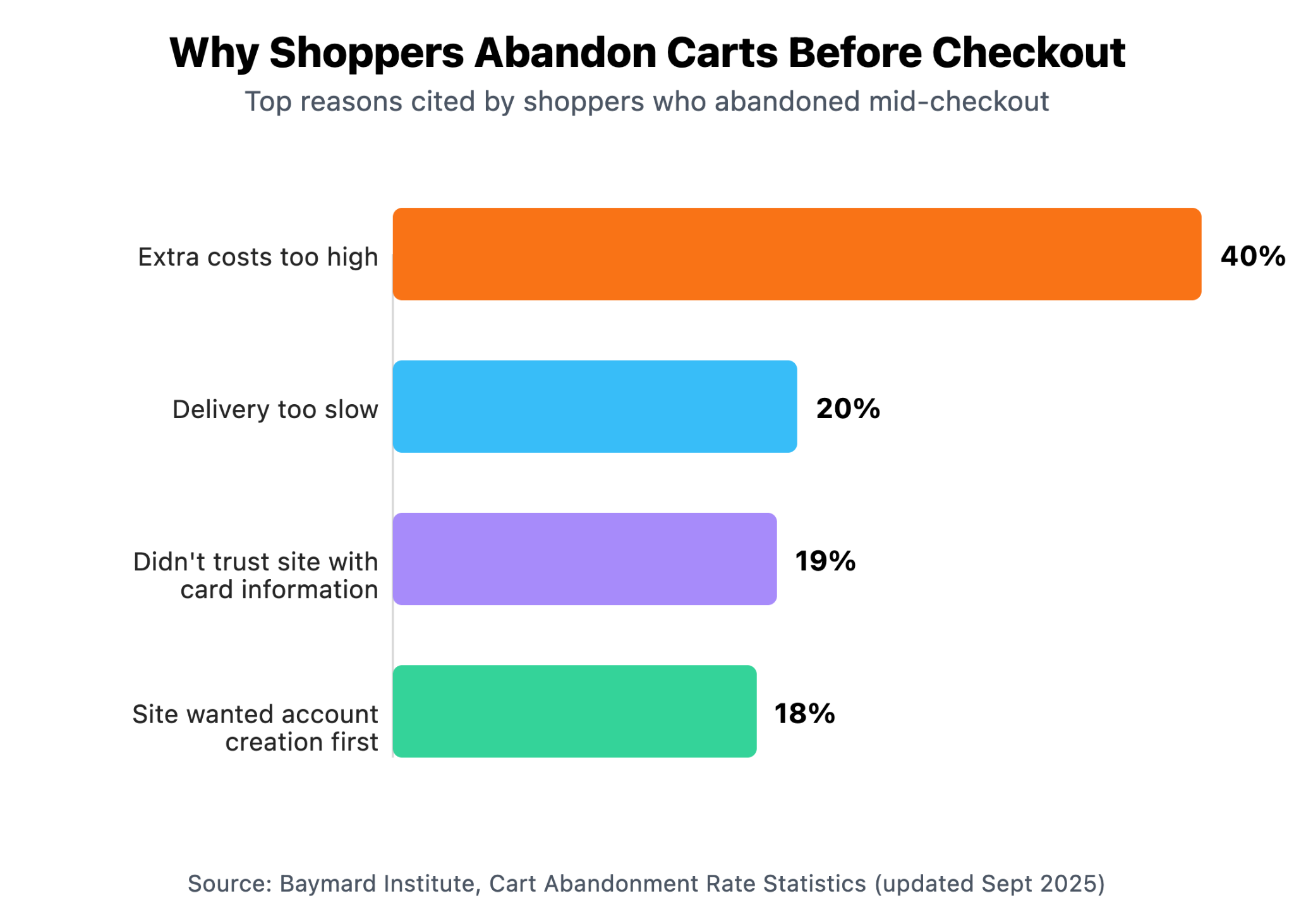
Two of those four reasons connect directly back to the wishlist-versus-save-for-later question. Forced account creation, at 18%, is the friction a persistent guest wishlist is built to remove. Distrust in providing payment information, at 19%, describes a shopper who isn't ready to complete a purchase at all, which is exactly the shopper a wishlist should be built for: not someone abandoning at checkout, but someone who never intended to check out on this visit in the first place.
Device switching adds another layer. Baymard's own abandonment data shows a wide gap between mobile and desktop abandonment rates, with mobile running meaningfully higher. A shopper who researches a product on their phone during a commute and comes back to buy it on a laptop that evening needs whatever they saved to follow them there. A cart-bound save tied only to that phone's session won't make the trip. A wishlist tied to the shopper's identity will, provided the store gives that shopper an easy, low-friction way to be recognized across both visits.
For more on what forced-signup friction costs a store beyond the checkout moment specifically, the hidden cost of not offering a wishlist.
Who Actually Uses Wishlists, and How?
Before building an elaborate wishlist strategy, it's worth setting realistic expectations about adoption. Wishlist usage isn't universal, and it isn't evenly distributed.
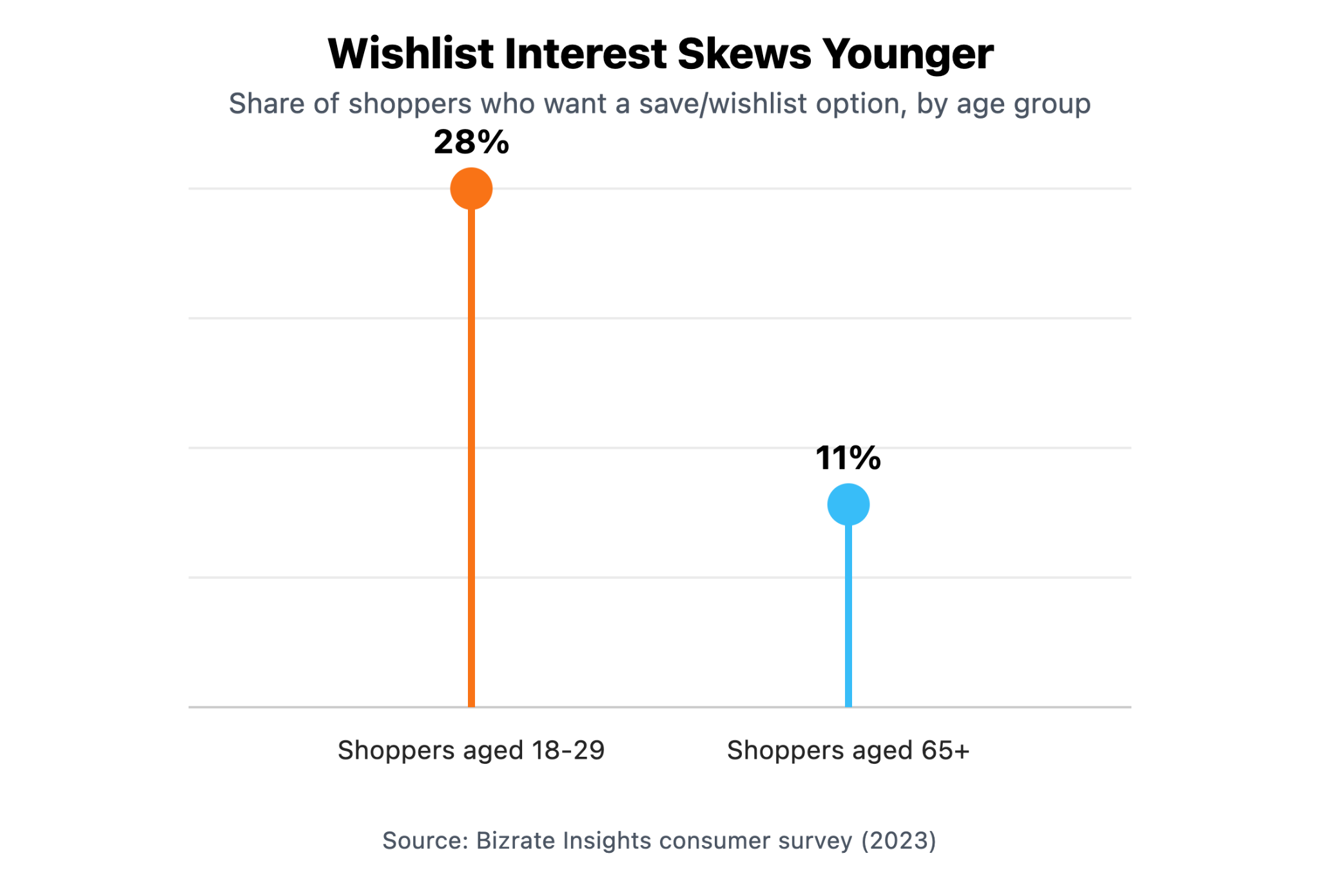
Shoppers aged 18 to 29 are more than twice as likely to want a save or wishlist option as shoppers 65 and older. If your store skews toward an older customer base, don't expect wishlist adoption to mirror what a fashion or beauty brand targeting younger shoppers might see. That doesn't make the feature not worth having; it means measuring its success against your actual audience rather than an industry-wide benchmark.
Even among shoppers who do report using a wishlist, the behavior isn't uniform:
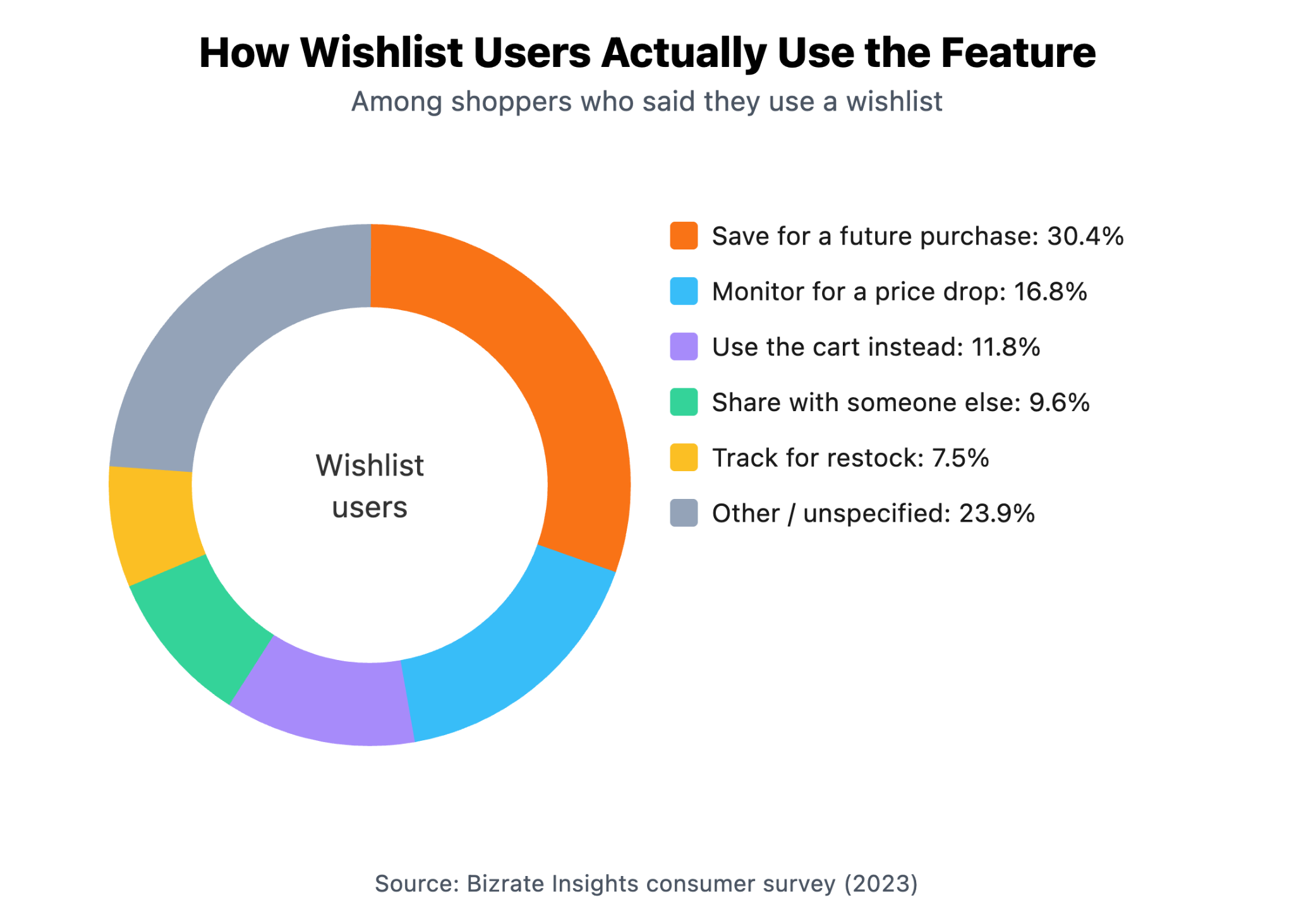
Notice the third-largest response: 11.8% of self-described wishlist users say they actually use the cart instead of a dedicated wishlist. That's the NN/g finding showing up again in a different data set: given the choice, a meaningful slice of shoppers default back to the cart as their save mechanism, wishlist feature or not. The takeaway isn't that wishlists don't work. It's that a wishlist has to earn its place next to the cart, not assume shoppers will find and prefer it automatically.
For a deeper look at reading this kind of data for your own store once a wishlist is live, [what your Shopify wishlist analytics are actually telling you covers the specific metrics worth tracking.
Do You Need Both Save for Later and a Wishlist?
For most stores, yes, and treating them as competing features misses the point. They're built for different moments in the same shopping trip.
Save for later handles the in-session, low-commitment save: a shopper comparing three variants of the same product, or deciding between two items while still actively browsing. It should stay fast and frictionless, because that's the entire value it offers. A wishlist handles something further out: the product a shopper genuinely wants but isn't buying today, whether because of price, timing, or just not being ready. That item deserves to survive the session ending, and it deserves a merchant who follows up on it deliberately rather than letting it disappear.
A dedicated wishlist page also opens up things a cart-bound save can't support well: organizing saved items into named collections for different occasions, sharing a list with someone else for gifting, or letting a shopper maintain more than one list at a time for different purposes. Our post on multiple wishlist options for Shopify covers how that works when a store needs it. None of that requires giving up save for later. A wishlist works alongside the cart, covering the saves the cart was never built to hold.
Turning Wishlisted and Saved Items into Sales
Neither feature earns its keep until something follows up on it. A save-for-later item that never triggers a reminder is functionally the same as a shopper who left and never came back. A wishlist entry that just sits on a page nobody looks at again is no better.
Back-in-stock alerts are one of the clearest examples of what a well-connected wishlist can do that a cart save generally can't. Among benchmark data across merchant network, back-in-stock emails rank as one of the highest-converting automated flow types a store can send, and yet a striking share of brands don't use back-in-stock automation at all, leaving one of the best-performing email types largely unclaimed.
That's a wishlist advantage specifically: it knows which shoppers wanted which out-of-stock product, so it can notify exactly the right person the moment that product is available again. Flits ships this as a built-in feature, no separate tool or workflow needed to connect a restock to an email Flits' back-in-stock feature.
The bigger structural advantage shows up in how wishlist data reaches your email platform in the first place. Flits connects directly to Klaviyo, so every save and every back-in-stock trigger syncs over as a customer event, not a static export someone has to pull manually. That means a merchant can build a segmented flow off exactly what a shopper saved, rather than sending the same generic "come back" email to everyone who touched the site Flits' Klaviyo integration covers the setup in more detail. A cart-bound save-for-later item, by contrast, usually has no dedicated trigger of its own; at best it rides along inside a broader abandoned-cart flow that treats every reason for leaving the same way.
How to Decide What Your Store Needs?
A short, practical way to work through it:
- If your catalog is largely impulse or low-consideration purchases (accessories, small consumables), a solid cart-level save for later may be enough on its own. Shoppers aren't waiting weeks to decide.
- If your catalog includes higher-priced or longer-consideration items (furniture, apparel with sizing decisions, electronics), a wishlist earns its place. Those purchases genuinely span multiple sessions and devices.
- If your store sees meaningful guest checkout traffic, prioritize a wishlist implementation that doesn't force account creation before a first save. That's where most of the friction Baymard documents actually lives.
- If you already run Klaviyo or a similar platform, weigh a wishlist app by whether it hands over real event-level data, not just a static list a marketer has to export by hand.
- If you're not sure your audience wants either feature, check your own numbers before investing heavily. Adoption skews by age and by category, so a benchmark from an unrelated store won't tell you much about yours.
Our proven ways to turn wishlist saves into sales goes further into the tactical side once you've decided a wishlist fits your store.
Frequently Asked Questions
Is a Shopify wishlist the same thing as save for later?
Not quite. Save for later is a cart-level feature, usually tied to a browser session or logged-in account, that holds an item without removing it from the shopping flow entirely. A wishlist is a standalone, persistent list tied to the shopper's identity, built to survive across sessions and devices, typically with its own dedicated page.
Does Shopify include a wishlist or save for later feature by default?
It doesn't. Shopify's default cart and theme setup doesn't include a distinct save-for-later state or a dedicated wishlist page out of the box. Stores that offer either feature have built it into their theme directly or added an app that provides it.
Can guests use a wishlist without creating an account?
It depends on the app. With Shopify wishlist apps like Flits Wishlist, they can. A well-built guest wishlist lets a shopper save products from their first visit, tied to their browser or device, without requiring signup first. Weaker implementations require an account before the feature works at all, which reintroduces the exact friction that pushes some shoppers away from checkout in the first place.
Do wishlists actually increase sales, or do they mostly sit unused?
Usage isn't universal, and expecting every shopper to adopt the feature sets an unrealistic bar. What the data supports is narrower and still valuable: wishlist saves are a genuine intent signal, and when a store follows up on them with relevant, product-specific messaging, that follow-up performs well. The feature itself doesn't sell anything; the follow-up does.
Should I call it "Wishlist," "Save," or "Favorites" in my store's navigation?
Any of them work mechanically. Some UX research suggests "Save" or "Favorites" avoids the gift-registry connotation that makes a few shoppers hesitant to use something labeled "Wishlist" for themselves. If you're unsure, test it against your own audience rather than assuming one label is universally better.
The Bottom Line
Save for later and a wishlist solve different problems, and conflating them is why a lot of stores end up with a feature that technically exists but doesn't do much. Save for later should stay fast and frictionless, living inside the cart where a shopper already is. A wishlist needs to survive well beyond that session, work for guests without demanding an account first, and feed directly into whatever email or SMS platform actually brings a shopper back.
Most stores that see real results from wishlists treat the save as the beginning of a relationship, not the end of one. If your store doesn't yet have a wishlist that does that, that's the gap worth closing first.
Not yet ready to upgrade your Shopify store’s wishlist? Start with our complete guide to Shopify wishlists!