.png)
Most email marketing is guesswork. You pick a segment, build a campaign, and hope the timing lands.
A customer’s wishlist removes the guesswork entirely.
When a shopper saves a product to their Flits Wishlist, they’re not browsing. They’re not vaguely curious. They’re telling you exactly what they want, in explicit terms, and choosing to come back for it later. That “later” is the window. Email, timed to the right moment, turns it into a purchase.
The Flits Wishlist x Klaviyo integration connects wishlist activity on your store to Klaviyo’s automation layer. When wishlist activity is synced to Klaviyo, merchants can automate timely emails based on customer intent and engagement.
You gain access to first-party customer intent data that can be used to build more targeted email campaigns and automated workflows.
Why Wishlist Data is Different
Most behavioral signals you get from shoppers are inferred. A page view might mean interest. A cart add might mean intent. Both might also mean nothing.
A wishlist is a declaration of intent. The shopper opened a product, chose to save it, and left it there. They want it. Something stopped the purchase, whether that was price, availability, or timing. Your job is to remove that obstacle when the moment arrives.
That’s what makes wishlist-triggered emails so effective. They are not interruptions. They are responses to something the customer already expressed. Wishlist-triggered emails are often more relevant because they are based on products customers have already chosen to save.
Flits captures that data through the Flits Wishlist App. Klaviyo delivers the message. Together, they close the gap between “I want this” and the actual order.
Email Automation Use Cases with Flits Wishlist and Klaviyo
Once the Flits Klaviyo Integration is enabled, wishlist activity can be used to power automated email workflows. Common workflows merchants set up include:
1. Back in stock alerts
A customer tries to buy a product that’s sold out. They click “Notify Me” and save it to their wishlist. When the product is restocked, Klaviyo fires an email immediately. No delay, no manual send. The shopper who wanted it first finds out before anyone else does.
This is one of the highest-converting email types in e-commerce because the customer has already decided to buy. The only thing that stopped them was availability.
2. Wishlist reminders
A shopper saves three products on a Tuesday and never returns. Two weeks later, Klaviyo sends a reminder: “You have items waiting”. The products are shown, the links go directly to the product pages, and the path back to purchase has no friction.
The timing is configurable. Some merchants send after 7 days. Others wait 14. The right window depends on your product category and typical purchase cycle.
3. Price drop alerts
A wishlisted product goes on sale. Klaviyo notifies the shoppers who saved it. For customers where price was the sticking point, this email converts at a rate that most other campaigns don’t come close to.
It's one of the few emails a customer is genuinely happy to receive.
How It Works
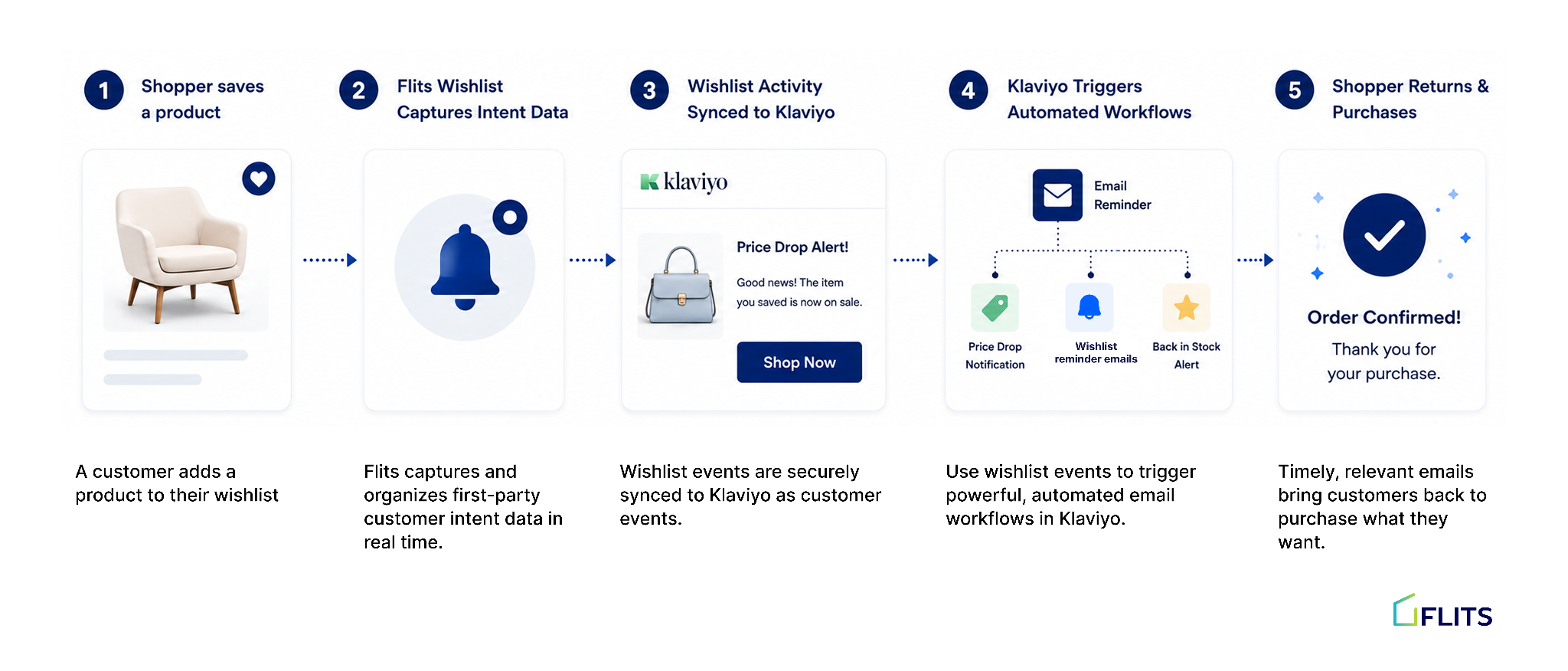
Flits Wishlist sends wishlist events to Klaviyo, which serves as the underlying data layer. Customer wishlist actions captured by Flits are synced with Klaviyo, where merchants can use that data to build automated workflows, customer segments, and personalized email journeys.
On the Flits side, wishlist activity is tracked per customer and per product, with real-time updates. On the Klaviyo side: you build flows using those events as triggers, set timing rules, and design the emails.
Flits provides the signal. Klaviyo delivers the message. You control the copy, the design, and the timing in Klaviyo. Once flows are live, everything runs automatically.
The customer’s wishlist data powers all of it.
Why Connect Flits Wishlist with Klaviyo?
Most wishlist email campaigns rely on broad customer segments. Wishlist activity provides valuable customer intent data by showing exactly which products shoppers are interested in.
With the Flits Wishlist App and Klaviyo working together, merchants can create more relevant customer journeys, improve engagement, and keep products top of mind long after a browsing session ends.
What Merchants Get from Wishlist Analytics
The Klaviyo integration is one part of the picture. The other is what Flits Wishlist shows you before the email ever goes out.
The Flits Wishlist analytics dashboard gives you product-level customer intent data: which items are being saved most, which are sitting on wishlists without converting, and which are OOS with customers waiting. That view tells you where the demand already exists.
Used together, the analytics inform which products to prioritize in price drops or restock campaigns, and the Klaviyo integration delivers the notification the moment the trigger is met. The insight and the action are connected.
Setting Up the Flits Klaviyo Integration
Connecting Flits Wishlist with Klaviyo takes just a few steps inside the Flits Wishlist admin.
- Once both apps are installed on your Shopify store, navigate to Wishlist Settings → Integrations inside Flits Wishlist.
- Enter your Klaviyo Private API Key, and save the configuration.
- After the connection is established, Flits begins pushing wishlist events to Klaviyo, and you build your flows on the Klaviyo side.
The Flits help center has step-by-step documentation covering the connection process and flow setup.
Before you start:
- Both apps need to be active. Flits Shopify Wishlist App handles the data. Klaviyo handles the email delivery. Both need to be installed and set up before the integration can do anything.
- Build the flows in Klaviyo before going live. Connecting the apps makes the events available. The emails won't go out until you've configured flows in Klaviyo and set them to active. Set up at least the back-in-stock and wishlist reminder flows before turning the integration live.
- Test with a real account. Trigger a wishlist event using a test customer profile and confirm the Klaviyo flow fires correctly before it touches live customers.
What to Set Up First
If you're connecting Flits Wishlist with Klaviyo for the first time, start with the workflows that make the most of your customers' wishlist activity:
1. Wishlist reminder emails
Not every shopper purchases the first time they visit your store. Wishlist reminders help bring interested customers back by highlighting products they've already saved. These campaigns are simple to set up and often become a reliable source of repeat traffic and conversions.
2. Back-in-stock alerts
When a customer saves an out-of-stock product, availability becomes the only barrier to purchase. Back-in-stock alerts ensure interested shoppers are notified as soon as the product returns, helping you capture demand while purchase intent is still high.
3. Price drop notifications
Some customers wait for the right deal before completing a purchase. Price drop notifications allow you to reconnect with shoppers when a wishlisted product goes on sale, giving them another reason to return to your store.
Together, these workflows help merchants turn wishlist activity into timely, relevant communication that keeps products top of mind and encourages customers to complete their purchase.
Getting Started
- Install Flits Wishlist from the Shopify App Store
- Enable the wishlist button on your product and collection pages
- Install Klaviyo and set up your account if you haven't already
- In the Flits Wishlist admin, connect your Klaviyo account
- In Klaviyo, build flows using Flits wishlist events as triggers
- Test each flow before going live
Wishlist activity is one of the clearest indicators of customer intent. Connecting Flits Wishlist with Klaviyo helps turn that intent into timely, relevant communication that keeps shoppers engaged and brings them back to products they already care about.
If you're already using Klaviyo for Shopify Email Marketing, integrating it with Flits Wishlist is a simple way to make your customer journeys more personalized and conversion-focused.
FAQs
1. Does Flits Wishlist send the email directly?
No. Flits sends wishlist event data to Klaviyo. Klaviyo handles delivery. You control email design, copy, and timing inside Klaviyo.
2. What events does Flits Wishlist send to Klaviyo?
Flits Wishlist sends wishlist-related customer activity to Klaviyo. Merchants can then use these events to build automated workflows, customer segments, and personalized email campaigns inside Klaviyo.
3. Can I customize the email templates?
Yes, entirely. Email design, copy, and timing are all managed on the Klaviyo side. Flits provides the event triggers and product data.
4. What if a shopper is not logged in?
Wishlist events are sent to Klaviyo for identified users. Anonymous wishlist activity is tracked in Flits but won't trigger Klaviyo flows without an associated email address.
5. Where do I go for setup help?
The Flits help center has documentation for the Klaviyo integration. You can also reach the Flits support team directly from the help center.