A customer finds a product they love, gets pulled away, comes back three days later, and cannot remember where they saw it. With a session like that a sale is also gone.
A Shopify wishlist keeps that from happening. But a save button on its own does not get you far, what you do with the wishlist, the data it generates, and the marketing it powers is how you get the revenue you’re chasing.
This guide covers the full picture: what a wishlist is, why it matters, how it works technically, the missing native options, what to look for in an app, how to set one up with Flits, how to design it, market with it, and measure it.
What Is a Shopify Wishlist?
A wishlist lets shoppers save products they want to remember without committing to a purchase. The flow is simple from a customer's perspective: they spot something they like, tap a heart icon or save button, and find it again later on a dedicated wishlist page.
Depending on the implementation, they can also share the list with friends or family, move items directly to cart, or receive alerts when prices drop or stock returns. This "save now, buy later" behavior is especially common in fashion, home décor, electronics, and gifting categories, where customers browse extensively before deciding.
A wishlist is different from a cart. The cart is a short-term checkout tool holding items a shopper intends to buy in that session. A wishlist is a long-term intent signal, capturing genuine product interest without purchase pressure.
The "save for later" feature found in some Shopify themes is closer to a wishlist but still operates within the cart flow. It lacks a dedicated page, sharing capability, and marketing hooks. Conflating these three features leads to poor UX decisions and missed revenue opportunities.
What Types of Wishlists Exist on Shopify
Shopify does not include a native wishlist feature out of the box. Merchants get one through theme customization, a standalone wishlist app, or a broader customer account app and Shopify wishlist app like Flits.
Within those options, implementations range from simple single-list saves to multi-list management, gift registries, and collaborative lists.
Guest wishlists (stored in the browser) and account-based wishlists (tied to a logged-in customer profile) represent the two main approaches, each with different tradeoffs around persistence and marketing usability.
Why Shopify Wishlists Matter for Your Business
The cost of not using Shopify wishlist is so high that it automatically makes sense to just install the app and start using it. A wishlist is not only for saving the product and hoping the customer would turn up again to buy it. It has greater values attached to it. Here are some of those:

1. Improve Customer Experience
Customers who cannot save products across sessions face a frustrating experience. They lose track of items, re-search the same products, and disengage from stores that require constant effort. A wishlist removes that friction. Shoppers can return with full context about what they liked, which shortens the path to a confident purchase.
For stores with large catalogs or frequent new arrivals, the wishlist becomes a personal curation layer that makes shopping feel organized and specific to the individual.
2. Capture High-Intent Product Data
Every product a shopper saves represents a deliberate expression of interest, not just a pageview, but an active choice. When a customer saves a specific SKU, you know the color, size, price point, and category that interested them.
Aggregated across your customer base, this behavioral data reveals which products generate genuine desire versus which ones simply appear frequently in search results. That distinction is commercially valuable in ways that pageview data alone cannot replicate.
3. Increase Conversions
Wishlists reduce the cart abandonment that happens when shoppers are not ready to buy immediately. Instead of losing that session, you capture intent and create a future touchpoint.
Reminder emails sent to wishlist users outperform standard promotional emails because they reference products the customer already chose.
Infact, price-drop and back-in-stock notifications triggered by wishlist activity hit customers at precisely the moment their barrier to purchase disappears, producing conversion rates that general campaigns rarely match.
4. Help With Merchandising and Inventory Planning
Sales data tells you what customers bought. Wishlist data tells you what they wanted but did not buy yet. And this gap carries a significant commercial weight.
A product accumulating thousands of wishlist saves but low sales may indicate a pricing issue, a stock problem, or a need for a promotional push.
Merchants who track "most-wished-for" products gain an early demand signal before it converts, informing buying decisions, bundling strategies, and markdown timing more accurately than sales history alone.
5. Support Marketing and Retention
Wishlist users tend to be your most engaged non-buying customers. They care enough to save products but have not converted yet, making them an ideal audience for lifecycle campaigns, loyalty program invitations, and re-engagement flows.
Shared wishlists and gift registries extend this further: when a customer shares their list, your store reaches new audiences through a trusted personal recommendation rather than paid advertising.
How Shopify Wishlists Work Technically
Here’s how Shopify wishlist works to help your customers save the products for later:

1. Store Data
The two main storage approaches are guest (browser-based) and account-based. Guest wishlists use browser cookies or local storage to save product IDs on the device. No login required, but the list disappears when cookies are cleared or when the shopper switches devices.
Account-based wishlists store data tied to the customer's Shopify account, making them persistent across sessions and devices. From a marketing standpoint, account-based wishlists are more valuable because you can associate saved products with identifiable customers and trigger communications based on that data.
2. Connect to Themes and Customer Accounts
Most wishlist implementations work by injecting a button into product card templates and product detail pages, then linking to a standalone wishlist page hosted by the app or built into the theme. The wishlist page pulls saved product data and renders it with current prices, stock status, and cart actions.
When connected to Shopify customer accounts, the app can sync wishlist data with customer profiles, making it accessible in Shopify admin and passable to integrated tools like email platforms and analytics dashboards.
What to Look for in a Shopify Wishlist App
There is no native Shopify wishlist feature. So if you want to add this functionality to your store, you need to use third party Shopify wishlist apps like Flits. Here’s what to for:
Core Features
Every wishlist app should:
- Allow customers to add and remove products easily
- Display a clean and functional wishlist page
- Work reliably across desktop and mobile
- The save action must provide immediate visual feedback
- It must load quickly and show current prices, stock status, and a clear path to add items to cart
Apps that cannot deliver these basics will generate more support requests than revenue.
Advanced Features
Once the core is covered, advanced features determine how much the wishlist can drive revenue.
Price-drop alerts and back-in-stock notifications are high-value triggers because they reach customers at the exact moment a purchase barrier is removed.
Multi-list support increases utility for power shoppers and gift buyers.
Shopify wishlist analytics, specifically product save rates, conversion rates, and customer segment data, are necessary if you plan to use the wishlist as a data source for merchandising or marketing decisions.
Design and UX Choices That Matter
Wishlist button placement significantly affects usage rates. On product pages, the icon should sit close to the add-to-cart button or as an overlay on the product image. On collection pages, a small icon on the product card lets shoppers save without clicking through.
The icon style, button label, and color should match your brand rather than using generic defaults. The wishlist page needs to balance information density with decision speed: customers should review saved products and take action without scrolling through a cluttered layout.
What Flits Wishlist Offers Shopify Brands
Flits’ Shopify Wishlist app gives merchants a fully branded, data-rich wishlist experience without custom development. Rather than treating the wishlist as a standalone widget, Flits connects it to a broader customer account system; wishlist data lives alongside order history, loyalty points, and customer profile information.
That integration makes it easier to use wishlist behavior as a signal across your entire CRM and marketing stack.
How Flits Solves the Gaps Left by Native Options
Flits addresses the UX, data, and marketing gaps that basic wishlists create. The interface is clean and consistent across devices, with clear save confirmation and an organized wishlist page. Merchants get access to wishlist analytics including which products are most frequently saved and which wishlist customers convert at the highest rates.
The app supports guest wishlists for non-logged-in visitors, multi-list functionality for organized saving, and sharing features that extend your store's reach through customer networks.
Integrations with email and marketing platforms allow wishlist activity to trigger automated flows rather than sitting idle in a data silo.
How to Set Up a Wishlist in Shopify with Flits
We have a detailed guide on how to quickly set up Shopify wishlist using Flits. Here’s what the process looks like:
1. Install and Complete Onboarding
Installing Flits from the Shopify App Store takes a few minutes.
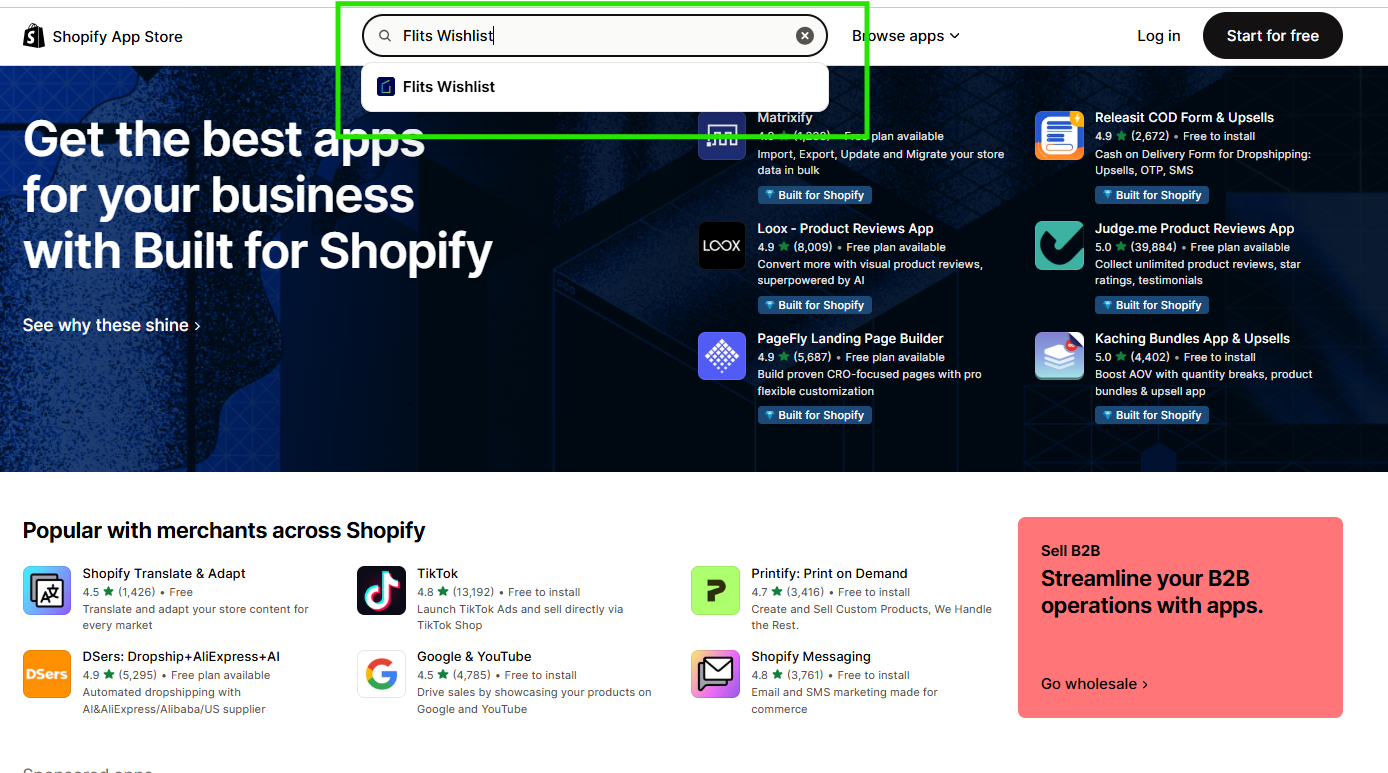
The setup flow covers permissions, customer account page configuration, and basic wishlist settings. During onboarding, you will connect Flits to your existing theme and choose whether guest wishlists are enabled, whether customers must log in to save products, and what the default wishlist structure looks like.
The process is designed for non-technical users, though theme-specific adjustments may require help from a developer or Flits support.
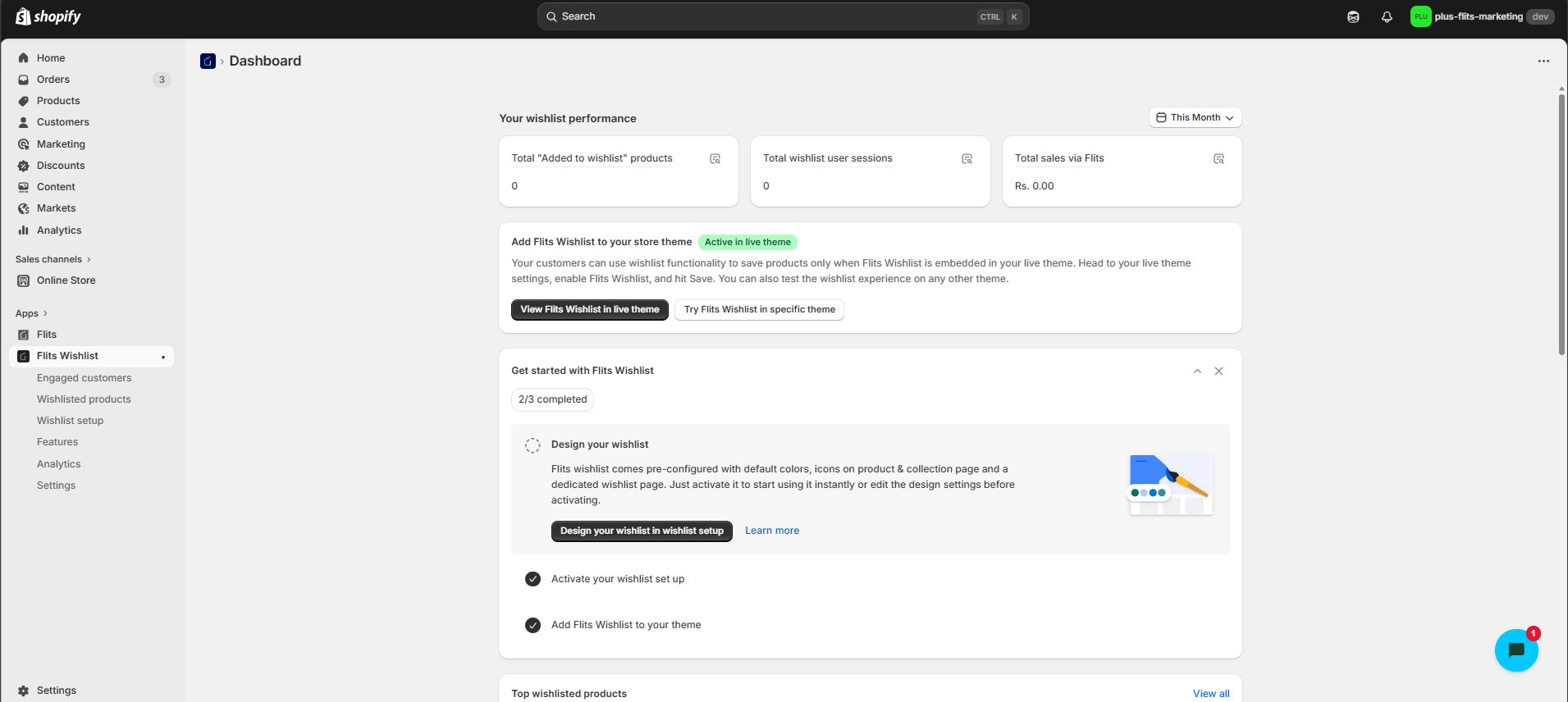
2. Add the Wishlist Button to Your Theme
Flits provides a wishlist button that can be added to product pages, collection pages, and quick-view modals. Placement is configured inside the Flits dashboard, where you choose which page types show the button and where it appears within the product layout.
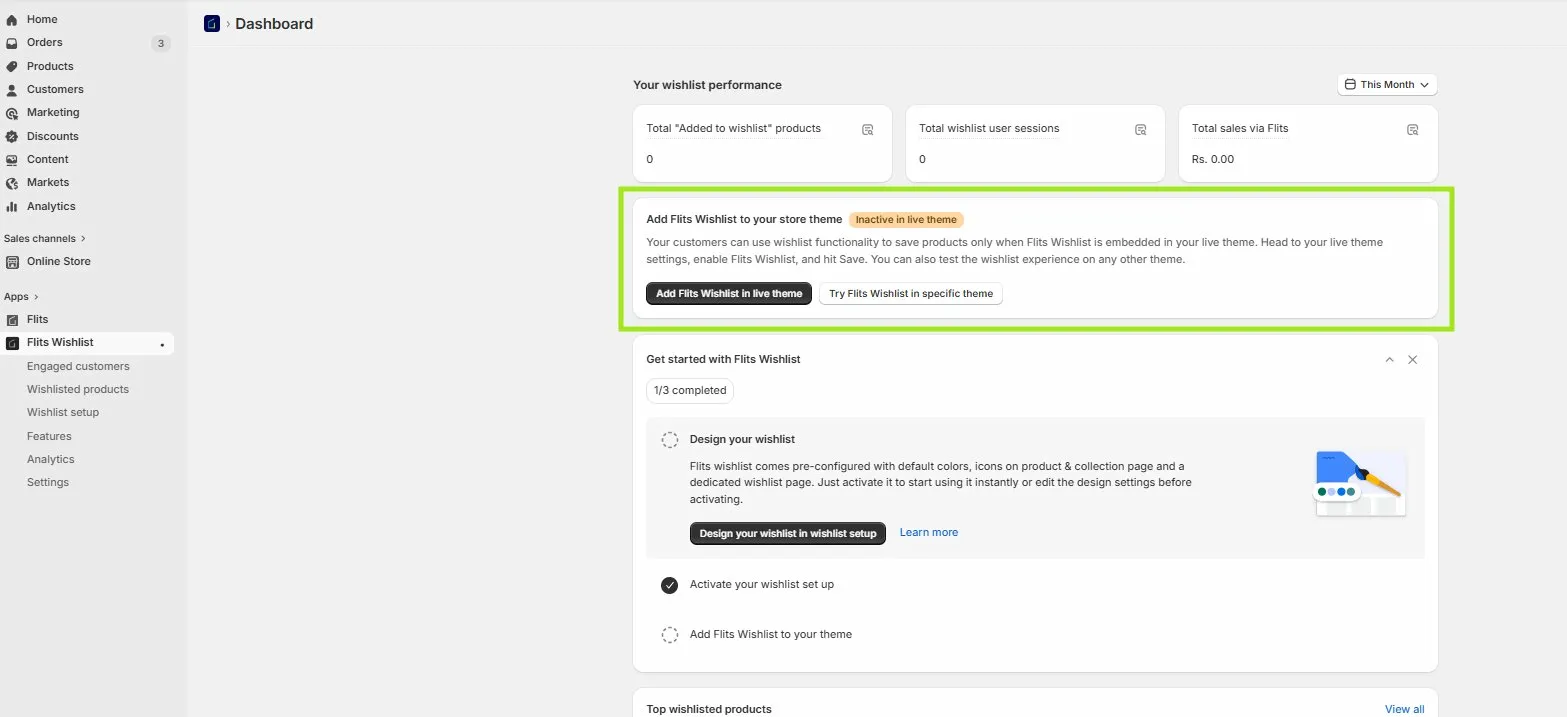
The button style (icon type, color, size, and label text) can be adjusted to match your brand without touching code. For themes with unusual structures, Flits offers manual placement instructions and handles compatibility issues with popular Shopify themes.
3. Test Your Wishlist Before Going Live
Before launching, run through the full customer journey on both desktop and mobile. Add a product to the wishlist as a guest, then as a logged-in customer. Confirm that items save correctly, the wishlist page renders all product information accurately, and the "add to cart" action from the wishlist works as expected.
Also test the edge cases: out-of-stock products, products with multiple variants, and products that have been removed from the catalog.
How to Design a High-Converting Wishlist Experience
If your Shopify wishlist is created keeping customer experience in mind, then there won’t be much positive impact on the revenue. You want it to be the most tapped button after payment and add to cart. Here’s what to keep in mind:
1. Decide Where to Place Wishlist CTAs
Placement drives usage. The product detail page is the highest-priority location because customers are in a discovery mindset when viewing individual products. The icon or button should sit close to the add-to-cart button.
On collection pages, a small heart icon in the top corner of each product card allows saving without interrupting the browsing flow. If your store uses a quick-view modal, adding the wishlist button inside it reduces saving friction significantly.
2. Design the Wishlist Page
The wishlist page should help customers make purchase decisions quickly. Each saved product needs a clear image, name, current price, stock status, and an add-to-cart button visible without scrolling. An "add all to cart" button accelerates multi-item purchases.
Remove buttons should be easy to access but not accidentally tappable. Keep the layout minimal because the goal is a fast decision environment, not a content-heavy page that competes with your product pages.
3. Optimize for Mobile
Mobile shoppers interact with wishlist icons using their thumbs, which means button targets need to be large enough to tap without misclicks. Product card icons should be at least 44x44 pixels.
On the wishlist page, stack product cards vertically with enough padding between them for comfortable scrolling. Avoid hover-based interactions, which do not translate to touch. Load time matters significantly on mobile. A wishlist page that takes more than two seconds to render will see high abandonment rates before customers engage.
If you choose to go with the Flits Wishlist Shopify App, you don’t have to worry about designing the wishlist flow and page. Flits Wishlist has a “build with AI feature” that follow all the Shopify wishlist best practices with AI making things seamless for you.
How to Use Wishlist Data for Marketing
1. Segment Customers Based on Wishlist Behavior
Wishlist data enables segmentation that purchase history alone cannot. Customers with large, active wishlists and low purchase rates represent price-sensitive or research-heavy shoppers. These customers are ideal targets for discount campaigns or early sale access.
Customers who regularly move wishlist items to cart are high-intent buyers who respond well to urgency-based messaging. Segmenting by product categories saved, rather than purchased, also reveals category affinities that sharpen product recommendations in email flows and on-site personalization.
2. Use Wishlists in Email and SMS Campaigns
Wishlist reminder emails perform best when they are specific, referencing the exact products saved, not generic catalog content. A simple "You saved these, they're still available" sequence sent seven to fourteen days after saving drives meaningful re-engagement.
Price-drop alerts sent immediately when a saved product goes on sale convert at a higher rate than standard promotional emails because the product is already pre-qualified by the customer's own behavior. Back-in-stock notifications for previously saved out-of-stock items create similar urgency with a narrowly targeted audience.
3. Use Wishlists in Paid and Organic Campaigns
Wishlist behavior can feed retargeting campaigns when synced to advertising platforms. Customers who saved products in a specific category become a high-value custom audience for ads featuring those products or close alternatives.
On the organic side, "most wished-for" product collections on your site and in social content signal genuine popularity. Shoppers respond to social proof that reflects real customer desire rather than curated best-sellers that often just reflect high margins or heavy ad spend.
How to Measure Wishlist Performance
1. Define Key Metrics
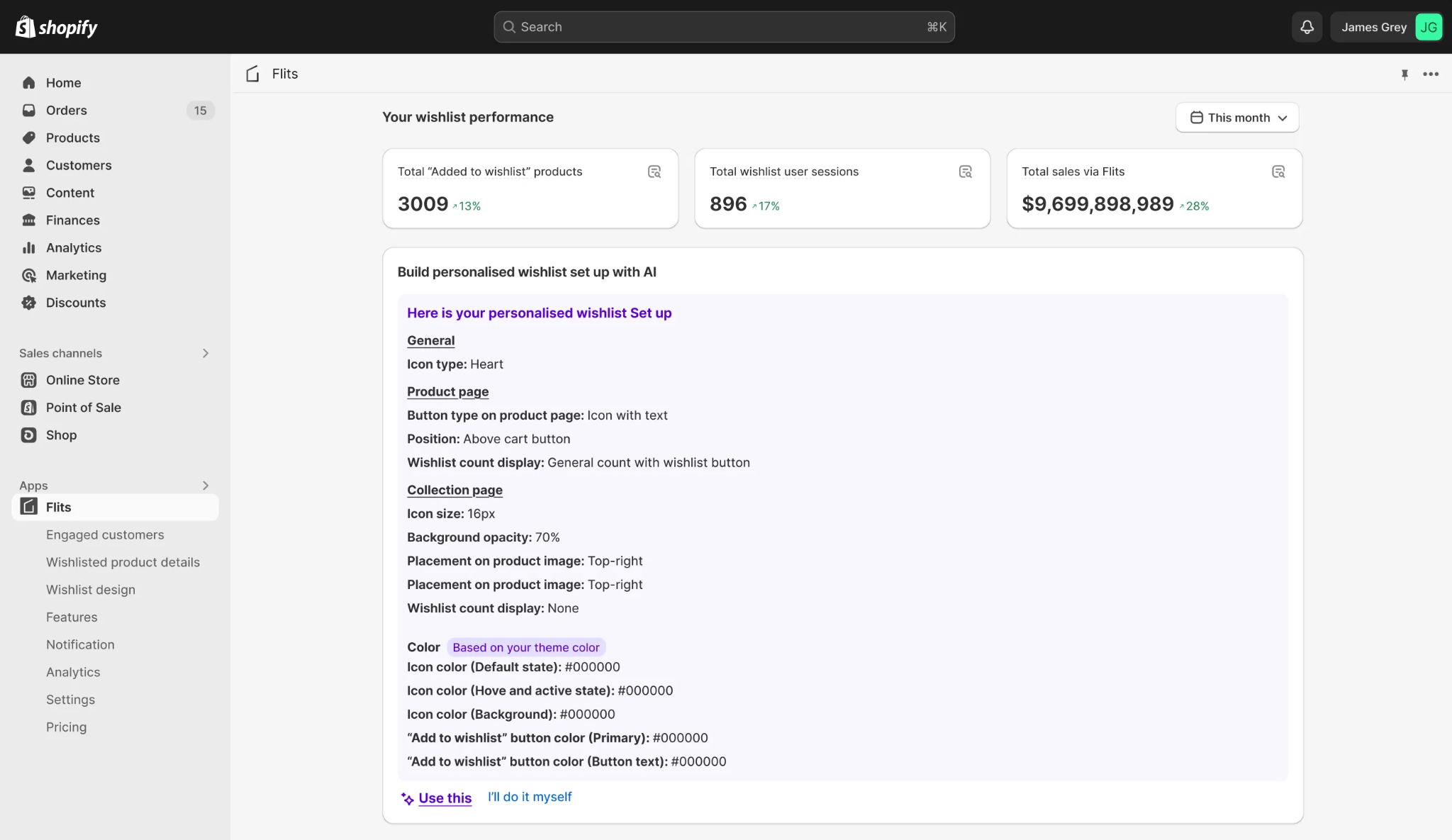
Three metrics anchor wishlist measurement: wishlist usage rate (what percentage of store visitors interact with the wishlist), wishlist-to-cart rate (how often saved items get added to cart), and wishlist-to-purchase conversion rate (how often a wishlist session results in a completed order).
Track them monthly and segment by device, customer type, and product category to surface the most actionable patterns.
2. Track KPIs in Flits and Shopify
Flits provides a dashboard with wishlist-specific analytics including product save counts, active wishlist users, and conversion data. Connect Flits data with your analytics platform, Google Analytics via events, or your email platform via behavioral triggers, to build a complete view of the wishlist's role in the customer journey.
Shopify's native reports can complement this by showing whether customers who use the wishlist have higher average order values or shorter purchase cycles than those who do not.
How to Troubleshoot Common Wishlist Issues
1. Fix Wishlist Buttons Not Showing or Saving
The most common issues are buttons not appearing on certain pages and items not saving correctly. Missing buttons usually result from theme template conflicts, the wishlist script cannot find the correct element to attach to, or a recent theme update broke the placement.
In Flits, check the placement settings first, then verify the theme is on the version Flits supports. Items failing to save often point to a browser storage conflict for guest wishlists, or a customer account permission issue for logged-in wishlists.
2. Handle Theme and App Conflicts
Multiple apps injecting scripts into the same templates can cause unpredictable behavior, buttons that appear and disappear, saves that do not persist, or wishlist pages that render broken layouts. Diagnosing these requires checking the browser console for JavaScript errors and identifying which scripts are loading in which order.
For complex multi-app setups, a developer familiar with Shopify's theme architecture will resolve conflicts faster than trial-and-error adjustments through the dashboard.
How to Scale Your Wishlist Strategy
A wishlist that works on day one looks very different from one driving segmented email flows, gift registries, and loyalty integrations a year later. Scaling well means adding each layer only when the previous one is performing.
1. Start Simple and Build with Intention
Most merchants begin with a single list, a save button, and a basic wishlist page. That is the right starting point. Before adding complexity, give the core experience time to settle. Check whether customers are finding the wishlist, using it across sessions, and returning to act on saved products. A simple setup that gets used consistently is more valuable than a feature-rich one that nobody navigates to.
2. Use Data to Decide What to Add Next
Every upgrade decision should come from the data you already have. If customers are saving products in large numbers but not converting, price-drop alerts and reminder emails are the logical next step. If the wishlist is getting traffic but few saves, the problem is placement or UX, not features. Adding multi-list support before fixing discoverability wastes time on a feature that will sit unused.
3. Build Advanced Workflows with Flits
Once the core is stable, Flits supports workflows that extend the wishlist into new commercial territory. Gift registries let customers share a curated list so friends and family can purchase directly from it. VIP early-access lists let loyal customers save and receive priority access before new products go live. Pre-launch saves let merchants track demand for unreleased items, turning the wishlist into a demand forecasting tool before a product even has a price.
4. Connect Wishlists to Your CRM and Loyalty Programs
A wishlist operating in isolation from your CRM and loyalty program misses its highest-value use case. When wishlist saves sync to customer profiles, you can trigger loyalty points for saving, prioritize high-save customers for VIP tiers, and feed wishlist category data into personalized email sequences. Flits connects to the customer account layer, which makes this kind of integration possible without rebuilding your existing stack.
5. Align Wishlist Strategy with Broader Business Goals
At maturity, the wishlist should contribute to measurable outcomes: higher customer lifetime value, stronger retention, better inventory decisions, and lower reliance on paid acquisition for re-engagement. Review wishlist performance quarterly against those goals rather than checking feature adoption in isolation. The wishlist is a channel, and it deserves the same strategic discipline you apply to email, paid media, and loyalty.
Getting Started with Flits Wishlist Today
If you have read this far, you already have a clear picture of what a well-built wishlist can do for your store. A good starting point is simpler than the full strategy: install Flits from the Shopify App Store, set up the wishlist button on your product and collection pages, and run through the test flows above before going live.
Once it is live, focus on three things first - making sure customers can find the wishlist easily, connecting it to your email platform to activate the first automated flows, and checking your analytics monthly to understand which segments and products are driving the most wishlist activity.
Flits Wishlist has a generous free tier that gives you most of the core functionalities. Start with the free tier today. Install Flits Wishlist!
Frequently Asked Question
1. Does Shopify have a built-in wishlist feature?
No. Shopify does not include a native wishlist. You need a third-party app or custom theme development to add one.
2. What is the difference between a wishlist and a cart?
A cart is for items a shopper intends to buy in the current session. A wishlist is for saving products to revisit later, with no purchase commitment.
3. Can guests use a wishlist without creating an account?
Yes, if the app supports guest wishlists. Items are stored in the browser, but the list will disappear if cookies are cleared or the shopper switches devices.
4. Will wishlist data carry over if a guest logs in?
It depends on the app. Flits merges guest wishlist data with the customer account on login so nothing is lost.
5. How does a wishlist increase conversions?
It keeps high-intent shoppers in your funnel. Instead of losing a session where someone is not ready to buy, you capture their interest and re-engage them through reminders, price-drop alerts, and back-in-stock notifications.
6. What products benefit most from a wishlist?
Any product category with a longer consideration cycle like fashion, home décor, electronics, beauty, and gifts sees the highest wishlist usage.
7. Can customers share their wishlists?
Yes, with the right app. Customers can share a link to their list, which is especially useful for gift registries and holiday shopping.
8. What is a gift registry and how is it different from a wishlist?
A gift registry is a shared wishlist designed for gifting occasions. Others can view the list and purchase items from it directly, often with tracking to avoid duplicate purchases.
9. How do I add a wishlist button to my Shopify theme?
Most wishlist apps, including Flits, handle placement through a dashboard without requiring code edits. You choose which pages show the button and configure the style to match your brand.
10. What happens if a wishlisted product goes out of stock?
A good wishlist app flags out-of-stock items on the wishlist page and can send an automatic back-in-stock notification when inventory is restored.
11. How do I know if my wishlist is actually driving revenue?
Track three metrics: wishlist usage rate, wishlist-to-cart rate, and wishlist-to-purchase conversion rate. These tell you whether the feature is being used and whether it is turning intent into orders.
12. Can I use wishlist data for email marketing?
Yes. Account-based wishlists connect saved products to customer profiles, which lets you trigger reminder emails, price-drop alerts, and personalized recommendations through your email platform.
13. What causes the wishlist button to disappear after a theme update?
Theme updates can overwrite the template files the wishlist script attaches to. Check the Flits placement settings after any theme update and reapply if needed.
14. How many wishlists can a customer have?
With a basic app, typically one. With Flits and multi-list support enabled, customers can create and name multiple lists, useful for organizing by occasion, category, or priority.
15. Is a wishlist worth it for a small or new Shopify store?
Yes. Even a basic wishlist adds immediate value by reducing session abandonment and giving you a foundation for future marketing. The earlier you start collecting wishlist data, the more useful it becomes as your store grows.