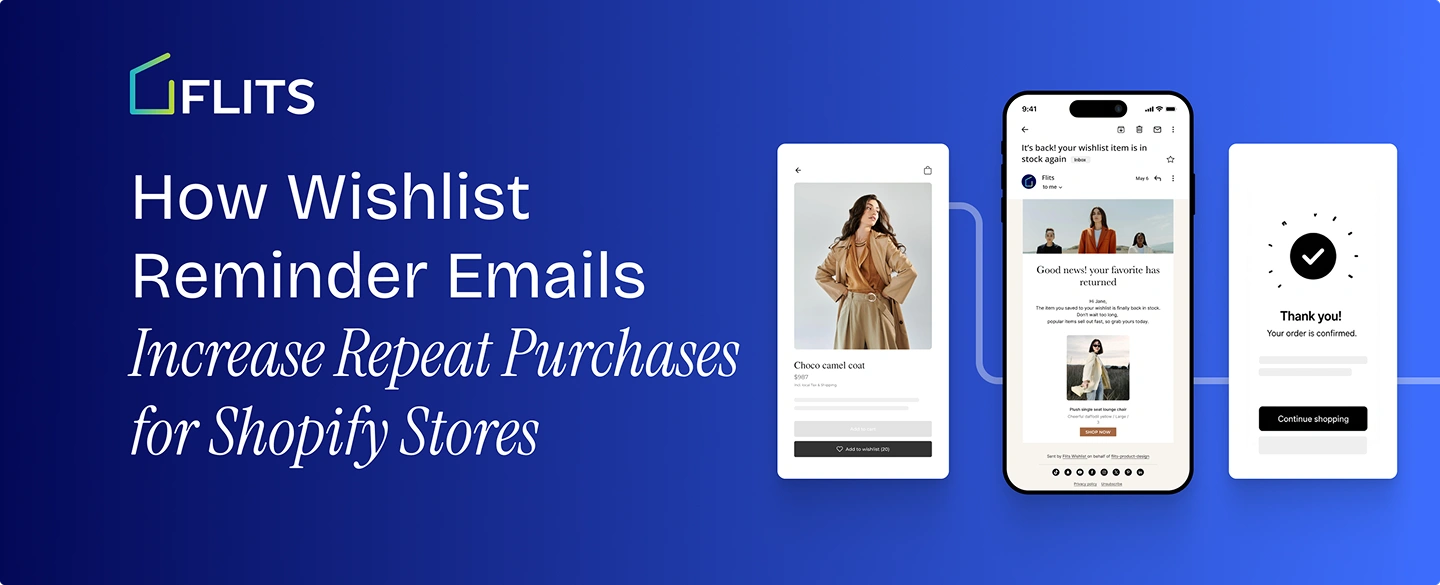
A wishlist save is a strange kind of signal. The shopper didn't buy, but they didn't leave empty-handed either. They told you, directly and specifically, what they want. Most stores collect that signal and then do nothing with it. The product sits in the wishlist, the shopper moves on, and the sale quietly evaporates.
Automated flow emails, the category that wishlist reminders belong to, get a 5.58% click rate on average compared to 1.69% for one-off campaign sends, based on Klaviyo's analysis of more than 183,000 customer accounts. That gap comes down mostly to timing and relevance, and a wishlist save is one of the most relevant signals a store will ever get.
This post covers why the follow-up matters more than the save itself, what the benchmark data says about triggered email performance, and how to build a reminder sequence that turns saves into repeat purchases instead of forgotten line items.
Key Takeaways
- Automated flow emails convert far better than one-off campaigns because they're timed to a specific action, not a calendar.
- Repeat purchase rates vary enormously by category, from under 15% in luxury goods to well over 40% in consumables, which means your reminder strategy should match your category, not a generic playbook.
- Browse and save-intent emails see meaningfully higher open rates than standard campaigns, roughly 42% for browse abandonment sends, because the recipient already showed interest.
- A working sequence is typically two touches plus an event-driven close: a nudge within 24-48 hours, a follow-up about a week later, and a back-in-stock trigger whenever it's relevant, not a single email or an endless drip.
- The mechanics matter less than the follow-through: a wishlist that doesn't feed an email or SMS platform is collecting intent it never acts on.
Why the Second Purchase Matters More Than the First
Repeat purchase rate varies a lot by category, and knowing where your store sits changes how aggressively you should be building reminder flows in the first place.
Where Your Category Likely Falls
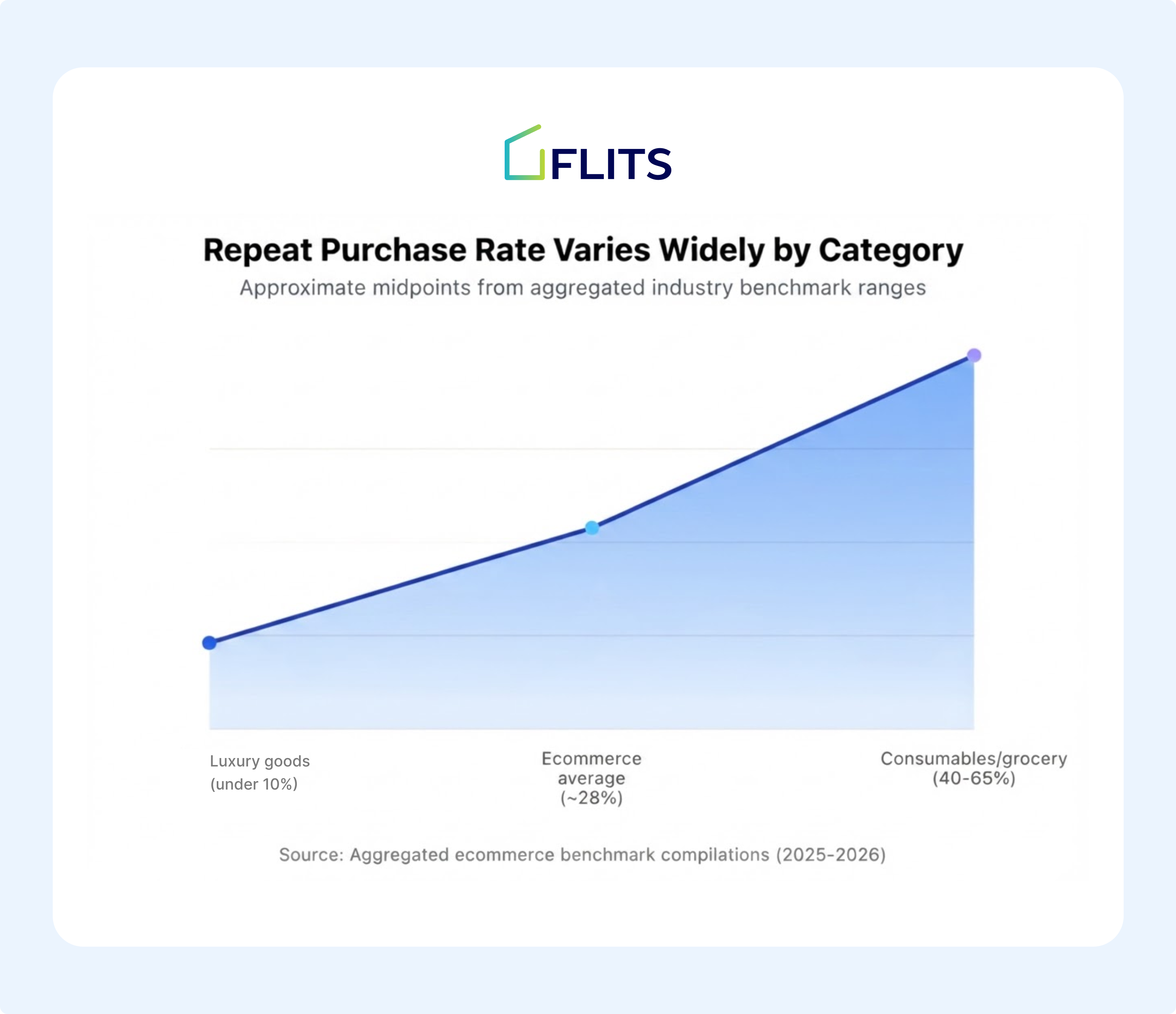
These figures come from aggregated industry benchmark compilations. Treat them as directional ranges for your category, not a precise number for your specific store. If you don't already know your own repeat purchase rate, it's worth pulling before you invest heavily in reminder flows: Shopify's own analytics or your email platform's dashboard can usually surface it as customers who placed a second order within a defined window, often 90 or 180 days.
Also Read: The Complete Guide to Shopify Wishlist for Merchants
The Retention Math, Worked Through
Even with the category caveat above, the underlying pattern shows up across most retention research: a small increase in how often existing customers come back tends to move profit by a lot more than the percentage suggests.
Frederick Reichheld's original research at Bain, later popularized through Harvard Business Review, found that a 5% increase in customer retention lifted profits by roughly 25% to 85% in the original study. That figure is often rounded up to 95% in how it gets cited today.
To make that concrete: a store doing $500,000 a year with a 28% repeat purchase rate isn't just looking at 28% of customers buying twice. It's looking at that group typically buying more per order, converting faster on subsequent visits since they skip the trust-building step, and costing close to nothing to reach again compared to a fresh acquisition channel. Move that 28% to 33%, a 5-point lift, and the retention research above suggests the profit effect compounds well beyond a proportional 5-point revenue bump, because the incremental customers are cheaper to serve on every dimension at once.
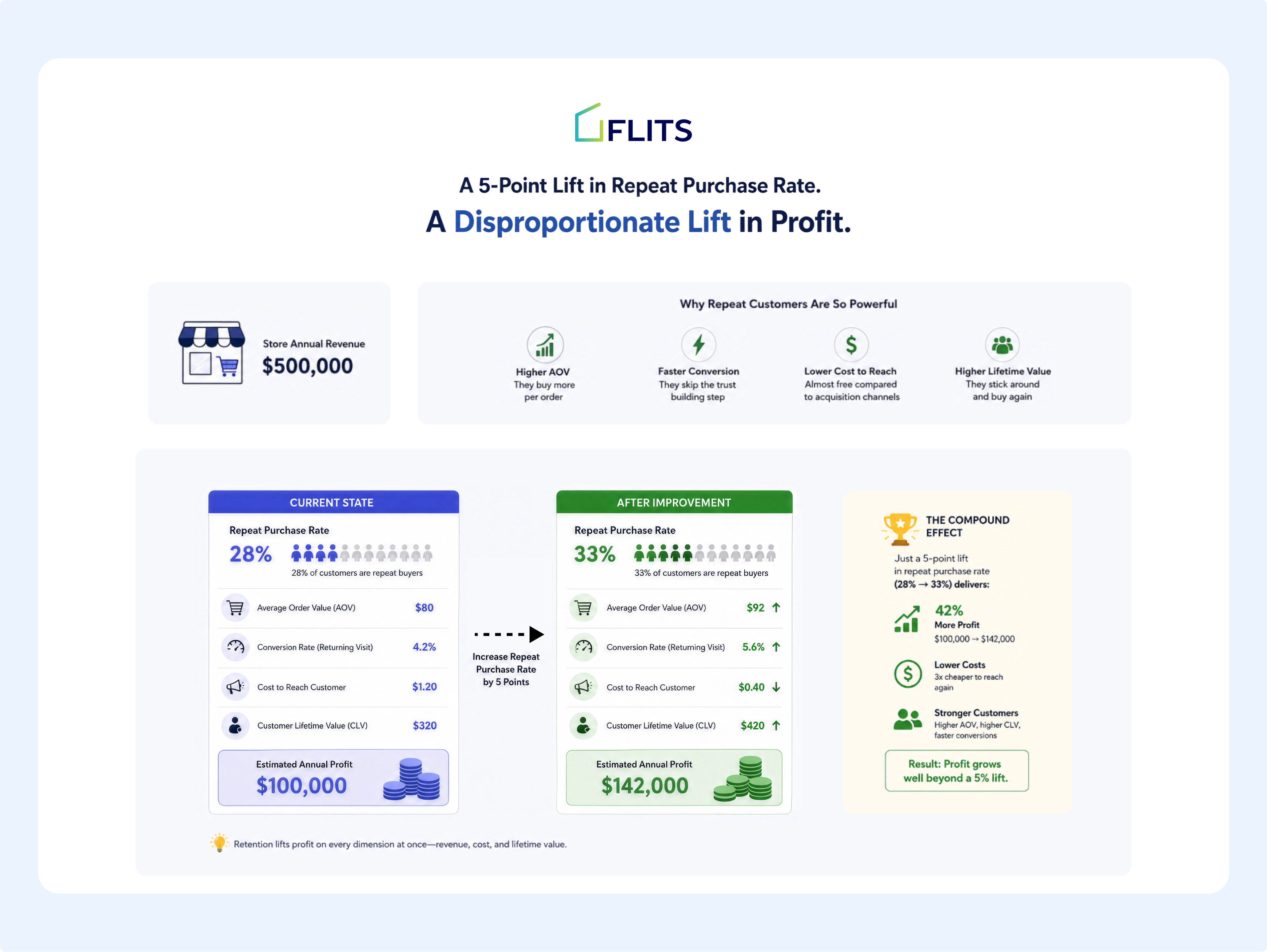
That's an old finding, but the mechanism behind it hasn't changed. A returning customer already trusts your store, already knows your sizing or your shipping times, and costs far less to sell to than someone you're reaching for the first time. A wishlist save is one of the clearest opportunities you'll get to turn a first-time browser into that returning customer, provided something actually follows up on it.
A Wishlist Save Is Not the Same as a Sale
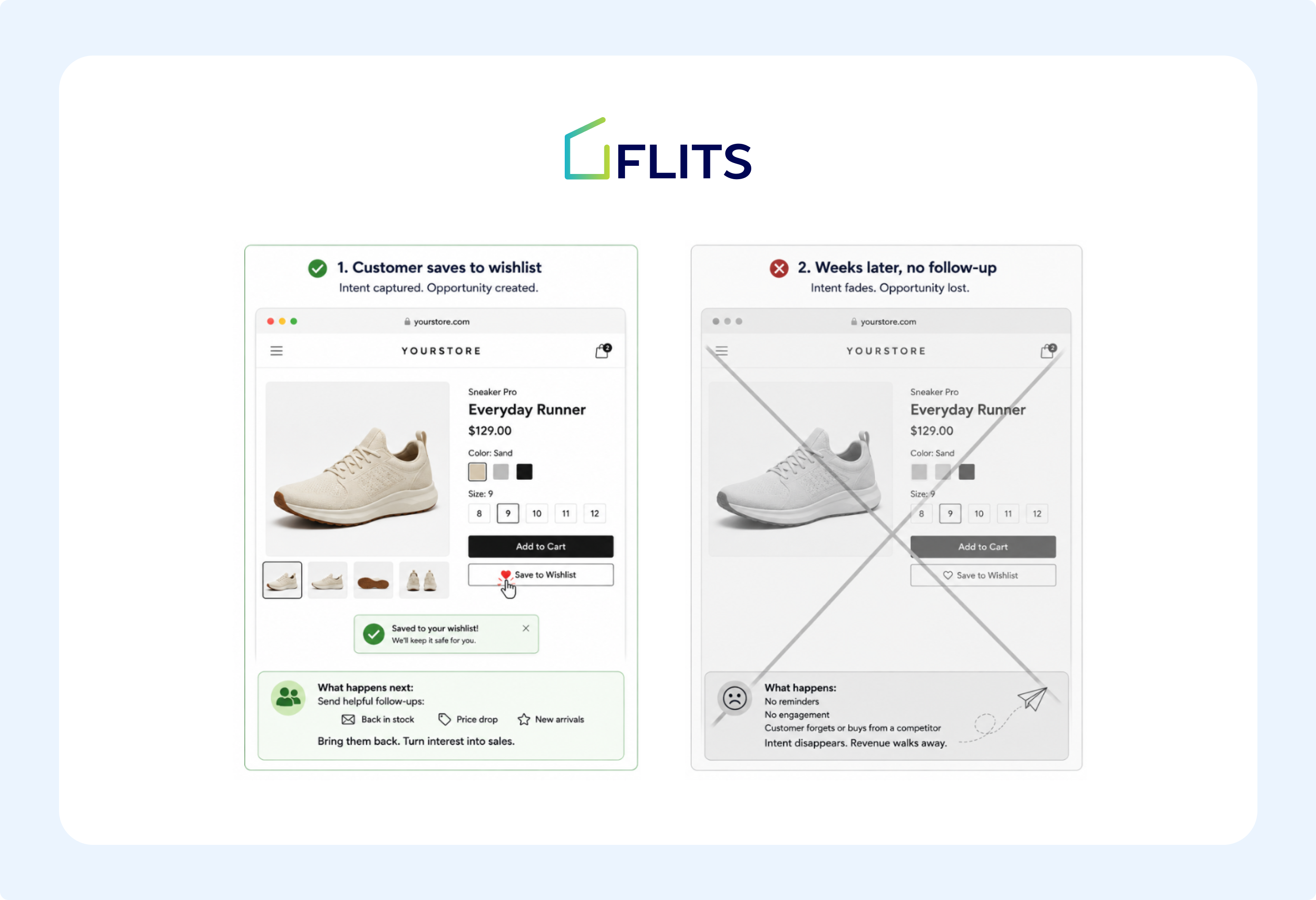
A shopper who saves an item has done something more deliberate than one who simply browsed and left. Browse abandonment, the broader category of "looked but didn't act," already gets treated seriously by most retention marketers: cart abandonment alone averages 70.22% across ecommerce, based on Baymard Institute's aggregation of more than 50 individual studies.
A wishlist save sits even earlier in that funnel and carries a stronger intent signal than a cart add in one specific way: the shopper wasn't trying to buy right now, they were trying to not lose track of something.
Wishlist vs. Cart vs. Browse: Three Different Signals
It helps to treat these as three distinct intent levels rather than one undifferentiated "didn't buy" bucket:
- Browse abandonment is the weakest signal. A shopper viewed a product page and left without saving or adding anything. They may have been comparison shopping, killing time, or simply distracted. Treat this signal as a light touch at most, since acting on it too aggressively reads as surveillance rather than helpfulness.
- Wishlist saves sit in the middle and are the focus of this post. The shopper made a small, deliberate choice to keep the product in view. That's enough intent to justify a dedicated, product-specific follow-up, but not enough to justify urgency tactics.
- Cart abandonment is the strongest signal. The shopper was at or near checkout. This is where discount codes and countdown timers earn their keep, because the shopper had already mentally committed to buying before something interrupted them.
Conflating these three, sending the same urgent "still interested?" email regardless of which action triggered it, is one of the more common reasons wishlist-adjacent flows underperform.
The message should match how far along the shopper actually was: a Shopify wishlist reminder reads better as "still thinking about this?" than as "your cart is about to expire," since the shopper deliberately chose "not yet" over "not interested," and a countdown timer misreads that choice as urgency it wasn't.
What Makes Triggered Wishlist Emails So Much More Effective
The gap between triggered and one-off emails runs close to 3x in click performance, and it comes down almost entirely to relevance.
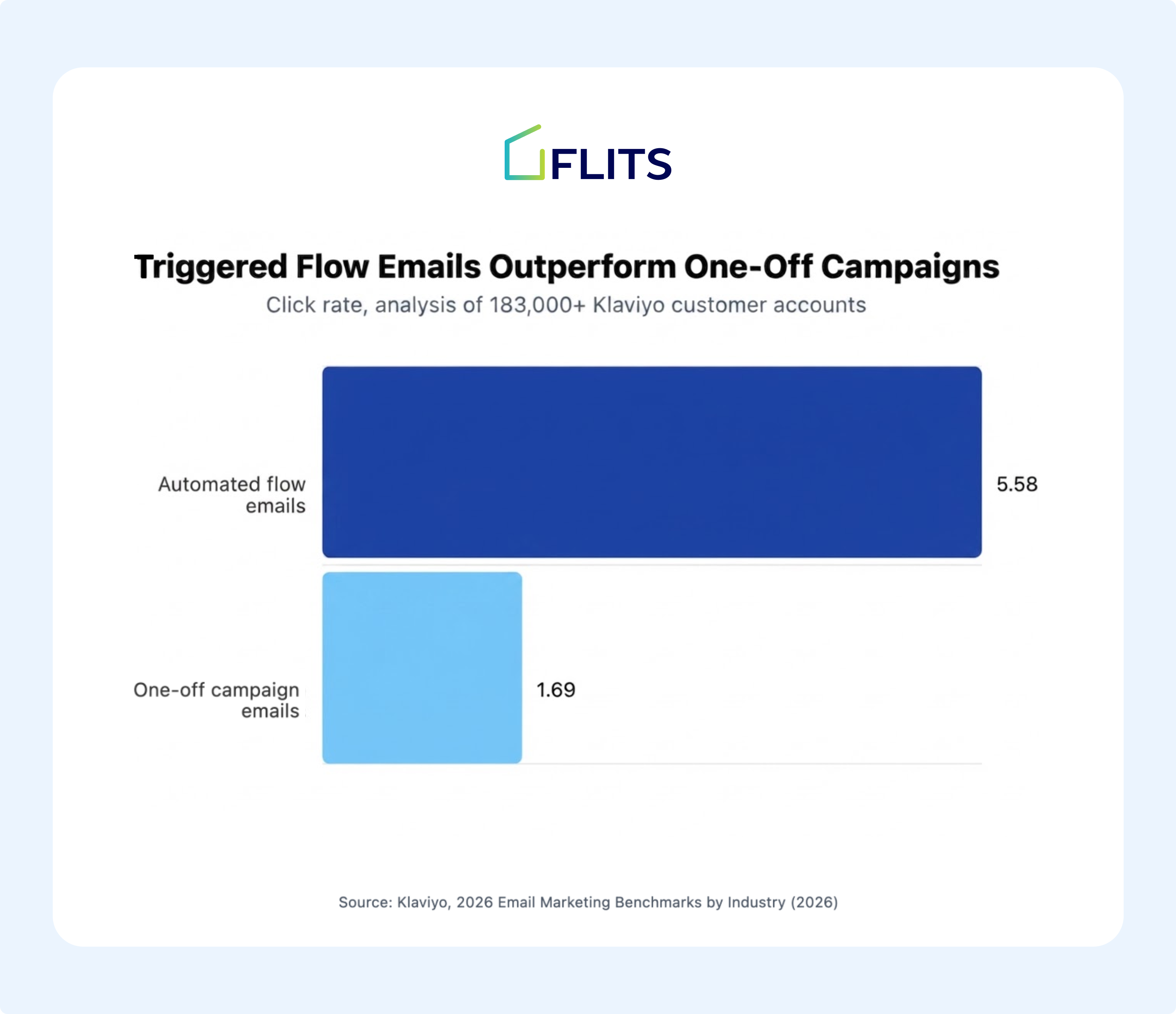
Klaviyo's 2026 benchmark data goes further: flows generate roughly 41% of total email revenue from only about 5.3% of total sends, and revenue per recipient on flows runs approximately 18 times higher than on campaigns. A campaign email goes to everyone on a list at the same time, regardless of what any individual subscriber actually cares about. A flow email goes to one person, triggered by something that person specifically did.
A Shopify wishlist reminder is a flow email by definition. It only exists because a specific shopper saved a specific product. That's exactly the kind of relevance the data above is describing, which is why the follow-up matters as much as the save itself.
Also Read: Flits Wishlist × Klaviyo Integration for Shopify
Building a Wishlist Reminder Sequence That Actually Converts
A wishlist reminder sequence works best as two or three touches, spaced out, each with a single clear purpose rather than one generic "don't forget" email repeated on a loop.
Email 1: The 24-to-48-Hour Nudge
Send the first reminder within 24 to 48 hours of the save. With Flits Wishlist, you can set a default Klaviyo wishlist-reminder integration to a 24-hour trigger, which reflects fairly standard practice across the category. Close to the save, the shopper still remembers exactly why they wanted the product, and the email reads as a helpful nudge rather than a surprise.
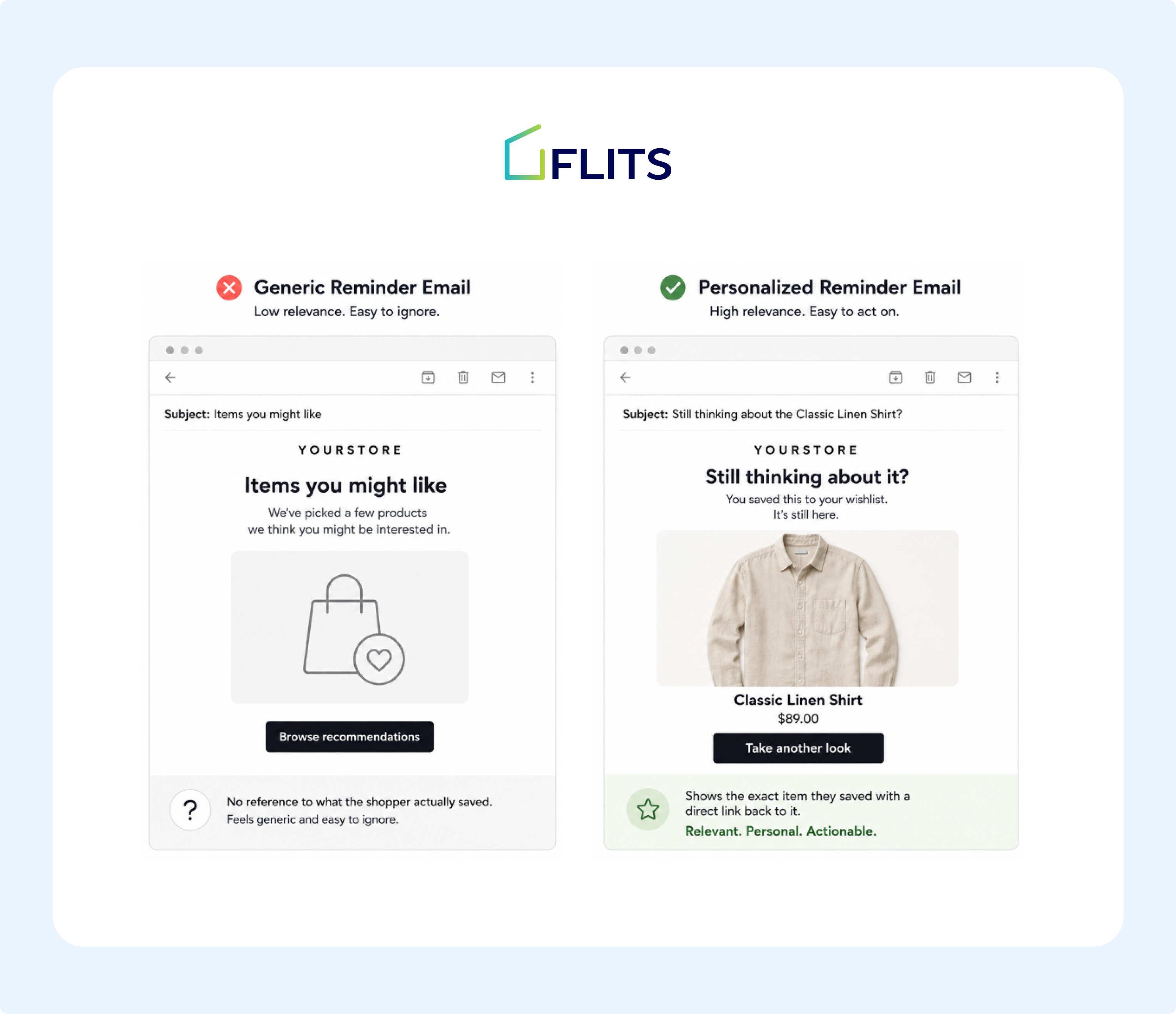
This email has one job: remind, not sell. Keep it to a single product block, one clear link, and language that sounds like it was written by a person who noticed, not a system that fired an automation.
Segmenting by What Was Actually Saved
A shopper who saved a pair of running shoes and a shopper who saved a winter coat shouldn't get the same email, and in a well-structured flow they won't, because the trigger event carries the specific product ID rather than a generic "wishlist updated" flag. This is less about copywriting effort and more about whether your wishlist data is structured enough to segment on in the first place, down to the specific product and variant saved.
At minimum, segment on:
- Product category so a footwear save doesn't trigger a generic "new arrivals" template built for apparel
- Price tier since a shopper saving a $40 item and one saving a $400 item respond to very different messaging, and the higher-tier shopper usually needs more reassurance (materials, returns policy, reviews) rather than more urgency
- Guest vs. account holder since a guest wishlist shopper hasn't gone through checkout yet and may need a lighter-weight path to purchase, not a "welcome back" tone that assumes prior account history
Email 2: The One-Week Follow-Up
Add a second touch about a week after the first, and stop there for most sequences. Omnisend's own recommended structure for the closely related browse abandonment category runs three emails plus one SMS message across the sequence. Beyond that, returns diminish quickly and the emails start to feel like pressure instead of a reminder.
This second email can carry slightly more weight than the first: social proof, a review snippet for the saved product, or stock-level context if the item is genuinely running low. What it shouldn't do is repeat the first email verbatim with a new subject line.
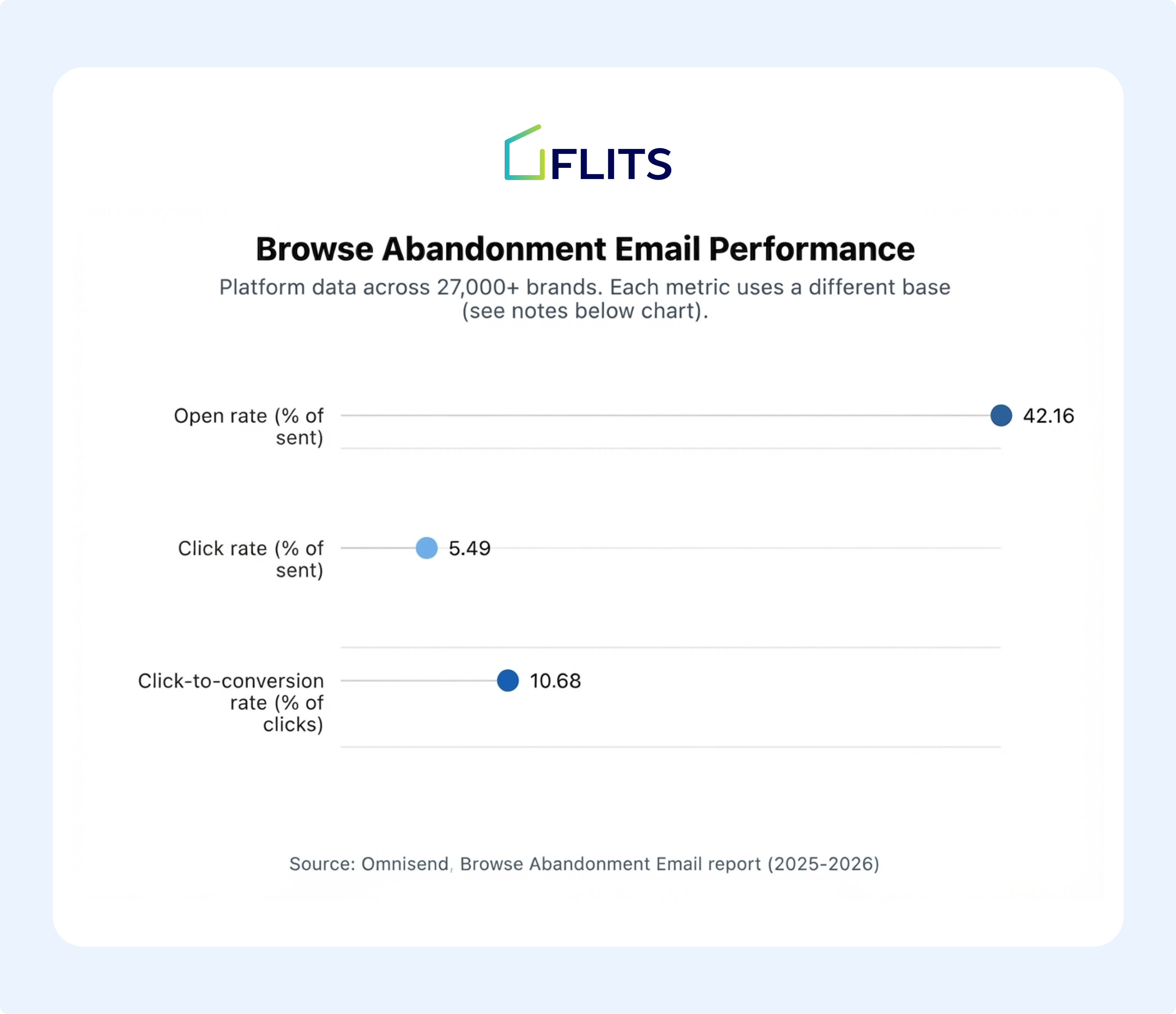
Browse abandonment emails, the closest publicly benchmarked analog to a wishlist reminder, see a 42.16% open rate and a 5.49% click rate measured against everyone the email was sent to, with a 10.68% click-to-conversion rate measured against just the people who clicked through. Those numbers noticeably beat generic campaign averages, which is consistent with the flow-versus-campaign gap covered above.
Closing the Loop with a Back-in-Stock Trigger, Not a Price-Drop Promise
If the saved item sells out before the shopper acts on either of the first two touches, an automatic restock alert is one of the strongest follow-ups available, because the shopper already asked to be told rather than being interrupted by a message they didn't request. Unlike the two timed touches above, this one is event-driven and can fire whenever the restock actually happens, whether that's two days after the save or two months later.
Be careful not to promise price-drop notifications unless that capability is actually live in your stack. If you are using Flits Wishlist, you’ll have access to both back-in-stock alerts and price-drop alerts.
What the Timeline Looks Like End to End
Laying the three touches against an actual calendar, rather than describing them as isolated tactics, makes it easier to spot where most stores fall short: not in any single email's content, but in what happens (or doesn't) in the gaps between them.
Here's a hypothetical shopper, Anna, moving through the sequence described above.
Day 0: Anna saves a jacket and leaves without adding it to her cart. Nothing fires yet. What matters at this moment is capture, not messaging: the wishlist app needs to log the specific product, variant, and timestamp cleanly enough for the next two steps to work at all.
Day 1: The nudge email goes out. Anna doesn't open it. That's a normal outcome, not a failure worth reacting to. A single non-open on email one is not a signal to escalate tone or add urgency on email two. It's just noise until you have a second data point.
Day 7: The follow-up email goes out with a different angle. Anna opens it this time, clicks through, and browses the product page again, but still doesn't buy. This is the point where a lot of sequences make their real mistake: sending a third or fourth email in the following days out of impatience. The better move is to go quiet and let the event-driven trigger, not another timed email, carry the sequence forward.
Two weeks later: Anna's size sells out and comes back in stock. Because the save was captured as a structured event rather than sitting in isolation, a restock email fires automatically. This email tends to convert at a meaningfully higher rate than either of the first two touches, since by this point Anna has already decided she wants the jacket. The only open question was availability, which is exactly what this email answers.
The gaps matter as much as the emails. A full week of silence after the second touch, broken only by an event that's actually worth interrupting the silence for.
Personalization and Channel: Where the Evidence Is Strongest
Personalization is the single lever with the strongest evidence behind it across every source in this post, which makes it the first thing worth getting right before worrying about timing or channel mix.
Why Product-Level Personalization Outperforms Generic Sends
Personalized emails generate roughly 6 times higher transaction rates than non-personalized sends, with 29% higher open rates and 41% higher click rates, according to Experian's marketing research. That study is more than a decade old, but the definition of "personalized" it's measuring, an email built around what a specific person actually did rather than a segment-wide guess, is exactly what a wishlist reminder is by construction. Every wishlist reminder is personalized by default in a way a typical newsletter never is, since it references a real product a real person chose.
AI-Assisted Recommendations as a Fresher Data Point
AI-driven product recommendations inside email lift click rates to an average of 3.75%, and as high as 8.79% for top-performing brands. The practical use case for a wishlist reminder is reinforcing the product the shopper already chose, rather than introducing new ones. A "you might also like" block can sit underneath if the platform supports it, but it should stay secondary to the main saved item rather than competing with it for attention.
SMS as a Second Channel, Not a Replacement
SMS is a reasonable channel to test alongside email for this use case. Several SMS platforms report notably higher open engagement for text-based reminders than email typically sees, though the exact multiples vary by platform and brand size enough that we're not going to quote a single number as universal.
If your customer base opts into SMS, it's worth testing as a second channel for the same wishlist-reminder logic, most naturally as the final touch in a sequence (the restock trigger, for instance, is a strong candidate for SMS given its urgency) rather than replicating the full email sequence over text.
How to Know Your Sequence Is Actually Working
A Shopify wishlist reminder sequence is only as good as whether you're actually measuring it, and the right benchmark to compare against is your own baseline, not an industry average pulled from a different category of store.
Open Rate: The First Signal, Not the Only One
Open rate tells you whether the subject line and sender name are working, nothing more. Compare your sequence's open rate against the browse abandonment benchmark cited earlier, roughly 42%, as a rough sanity check. If you're tracking well below that on the first email specifically, the subject line is the first thing to test, not the offer or the timing.
Click Rate and Conversion Rate: Where the Real Signal Lives
Click rate tells you whether the email content itself, the product shown, the copy, the single call to action, is compelling enough to bring the shopper back to the site. Conversion rate, measured against clicks rather than sends, tells you whether the product page itself is closing the sale once they arrive. A sequence with strong opens and clicks but weak conversion usually points to a product page problem (price, reviews, shipping information) rather than an email problem, which is a useful diagnostic distinction most merchants skip.
Revenue per Recipient: The Metric That Actually Matters for Prioritization
Open and click rates are useful for diagnosing a single email, but revenue per recipient is the number that tells you whether the entire flow is worth the engineering and design time it took to build. Klaviyo's benchmark data shows flows generating roughly 18 times higher revenue per recipient than campaigns; tracking this number for your wishlist reminder specifically, separate from your other flows, tells you whether it deserves further investment (a third touch, deeper segmentation) or whether the effort is better spent elsewhere.
Setting Your Own Baseline
None of the industry benchmarks in this post are a target to hit. They're a sanity check for whether your numbers are in a reasonable range. The number that actually matters is whether your sequence's performance holds steady, improves, or degrades over time, measured against your own store's history. Most email platforms will let you compare a flow's performance month over month; check that at least once a quarter rather than setting it up once and assuming it keeps performing.
Common Mistakes That Undercut Wishlist Reminder Emails
1. Sending One Email and Calling It Done
A single reminder catches shoppers who happened to check their inbox at the right moment and misses everyone else. A short sequence, not a single blast, is what the benchmark data above is actually describing. If your current setup fires exactly one email per wishlist save, adding a second touch a week later is the single easiest fix in this entire post.
2. Writing Generic Subject Lines
"You have items waiting" could be sent by any store to any customer. Naming the actual product in the subject line is what separates a flow email from a disguised campaign email, and it's a change most email platforms support through dynamic subject-line variables without any custom development work.
3. Requiring an Account Before a Shopper Can Even Save an Item
This blocks the signal before it's ever captured. Guest-accessible wishlists catch intent from shoppers who aren't ready to create an account yet, which matters given that forced account creation is a well-documented reason for checkout abandonment: Baymard Institute's research puts it among the top five cited reasons, alongside extra costs and slow delivery. A store that requires an account to save a wishlist item is filtering out exactly the shoppers who most need a gentle, no-pressure follow-up rather than an immediate purchase decision.
4. Letting the Wishlist Data Sit Inside the App Instead of Reaching Your Email Platform
A wishlist that doesn't sync to Klaviyo, or whatever platform actually sends the emails, functions as a bookmarking feature rather than a reminder flow. The follow-up is where the value in this whole approach actually lives, so this is less a mistake of execution and more a mistake of app selection: check whether a wishlist app's integration pushes structured, product-level events, not just a generic "activity happened" ping, before assuming the reminder-email piece will work out of the box.
5. Treating Every Sequence Like It's for a First-Time Visitor
A returning customer who saves a second or third item already trusts the store. Sending them the same "here's who we are" tone used for a brand-new shopper wastes an opportunity to skip straight to the product and, where relevant, acknowledge their history ("another great pick" reads very differently to a repeat customer than to a stranger).
6. Ignoring the Data After the Sequence Ships
Building the sequence once and never checking its performance again is its own mistake, distinct from any single email's content. A flow set up correctly in month one can quietly degrade as product mix, pricing, or platform deliverability rules shift, which is exactly what the measurement section above is meant to catch.
What This Means for Your Shopify Store
The pattern across this data is consistent: relevance beats volume, timing beats delay, and specific beats generic. A Shopify wishlist reminder sequence works because it's built on all three by default, provided the underlying wishlist data actually reaches an email platform in a usable, structured way.
Flits Wishlist is built around that last requirement specifically. Every save and back-in-stock trigger syncs to Klaviyo as a real customer event, so a reminder flow can be built around exactly what a shopper saved rather than a generic template. Guest wishlist support means the intent signal gets captured even from shoppers who haven't created an account. Back-in-stock alerts are live and built in today; price-drop alerts are on the roadmap but not yet available, so any sequence built around Flits should lean on restock triggers rather than price-drop promises for now. An AI-assisted wishlist page and flow builder handles the setup work, which matters if building segmented flows from scratch isn't something your team has time for.
Flits carries a 5/5 rating on the Shopify App Store and has been built by a team who are in the Shopify ecosystem for almost a decade.
The free plan is genuinely generous and covers core wishlist functionality. Guest wishlist and the full feature set sit on the Unlimited plan at $19 a month, flat, whether a store processes 10 orders a month or 10,000, with no tier above it and nothing gated behind a higher price later.
Frequently Asked Questions
1. How soon after a wishlist save should the first reminder email go out?
Within 24 to 48 hours is the common default across the category. Waiting on this loses the shopper's immediate context for why they saved the item.
2. How many emails should a wishlist reminder sequence include?
Two to three is a reasonable range, based on the three-email-plus-SMS structure we recommend for the closely related browse abandonment category. More than that tends to produce diminishing returns and can start to feel like pressure rather than a helpful nudge.
3. Does a wishlist reminder email need a discount to work?
Not necessarily. The evidence points toward relevance and specificity, referencing the exact saved product, mattering more than a price incentive. A discount can be layered in later if a store's margins support it, but it isn't the mechanism doing the actual work in the data above.
4. What's the difference between a wishlist reminder and a cart abandonment email?
A cart abandonment email targets someone who was close to checkout and can reasonably use urgency. A wishlist reminder targets someone who deliberately chose to save something for later rather than buy immediately, so a calmer, more informational tone tends to fit better.
5. Can a wishlist reminder sequence work without a dedicated email platform like Klaviyo?
It's possible with any platform that can trigger emails off a customer event, but the wishlist app needs to actually push that event somewhere. A wishlist that only stores data inside its own app, without syncing to an email or SMS platform, can't power a reminder sequence at all.